The complete guide to client intake forms in 2026
Most service businesses start working with a new client the same way: a message or call comes in, there's a brief conversation, and then work begins. It's fast, but it leaves some gaps. You don't know enough about the client, the client doesn't know what to expect from you, and both sides are filling in the blanks as they go.
A structured client intake process can fix this. It's the sequence of steps between first contact and the start of work. How you collect client information, set expectations, and confirm that the engagement makes sense for both parties. Done well, it turns an often unstructured initial conversation into a clear, documented starting point.
Of course, the intake process looks different depending on the industry. For a therapist, it includes consent forms, a clinical history questionnaire, and an explanation of confidentiality. For a coach or consultant, it's about understanding the client's goals, constraints, and what they've already tried. The specifics vary, but the underlying logic is the same: gather the right information at the right moment, before problems have a chance to develop.
One of the most important tools in any client intake process is the online intake form.
What an intake form is actually for?
An intake form is a set of questions you send to a new or prospective client before you start working together. But that description undersells what a well-built intake form actually does. We were quite surprised to learn that many consultants and service providers skip this step, or ask prospects to fill out a PDF file at best.
Intake forms can be extremely useful and can help you build trust in client relationships. It's four things at once: a first impression, a time-saver, a client filter, and a scope-setting tool.
Intake forms signal that you run a professional operation. Sending a clean, branded form before a first call tells a client you're organised and you've done this before. They also save time by eliminating the back-and-forth emails and the discovery calls where you spend the first twenty minutes gathering basic information that could have been collected in advance.
As a client filter, they reveal things about a potential customer before you're committed. Someone who refuses to give a budget range, leaves half the form blank, or takes three weeks to return it. You're learning something about how they'll behave as a client.
Online intake forms also create a written record of what the client said they wanted, needed, and expected at the start of the engagement. It is crucial to have all the essential information from the start, so that you don't have to get back to the client with questions on every single detail amidst the project.
How long should an intake form be?
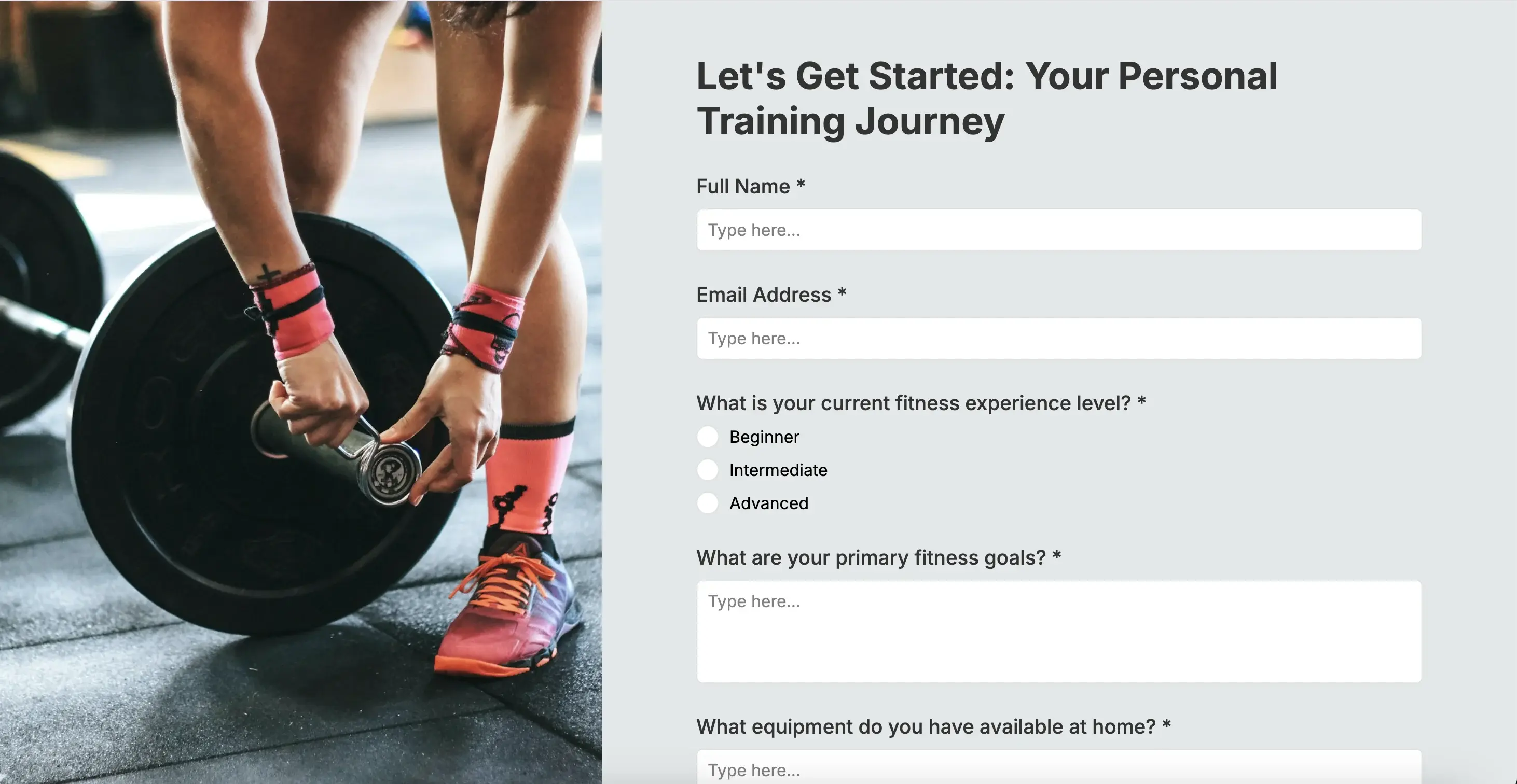
A perfect intake form should be short enough that clients complete it before the first call, and long enough to be useful.
In practical terms: aim for 8 to 12 questions for a service business intake form. Healthcare and therapy forms run longer by necessity, but even there, longer isn't automatically better.
At the same time, the format matters as much as length. A single-page form that requires scrolling has a significantly lower completion rate than a multi-step form that shows one section at a time. Breaking a 10-question form into three steps (e.g., contact details, project information, context questions) feels far less daunting than presenting all ten at once, even though it's the same form.
For healthcare practices specifically, digital intake forms sent before an appointment see 67 to 77% pre-visit completion rates.
The practical implications for intake forms:
Break anything over 8 questions into steps
Group related questions together. For example, contact details in one step, project or clinical context in the next, consent and preferences last. Three steps is usually enough.
Put the easy questions first
Begin with basic client information. Name, email, phone number - starting with simple fields creates momentum. Asking for sensitive or effortful information (medical history, budget, detailed project description) too early in the form increases drop-off. Save those for step two or three, when the client is already invested.
Show progress
A simple "Step 2 of 3" indicator significantly reduces abandonment. Clients who can see they're nearly done are far more likely to finish than those staring at an unknown quantity of remaining questions.
Use conditional logic to hide irrelevant questions
A form that asks everyone every question regardless of relevance feels longer and more frustrating than one that adapts. Conditional logic keeps the form short for the people it's short for, and appropriately detailed for those who need the extra questions.
When to send client intake forms and how
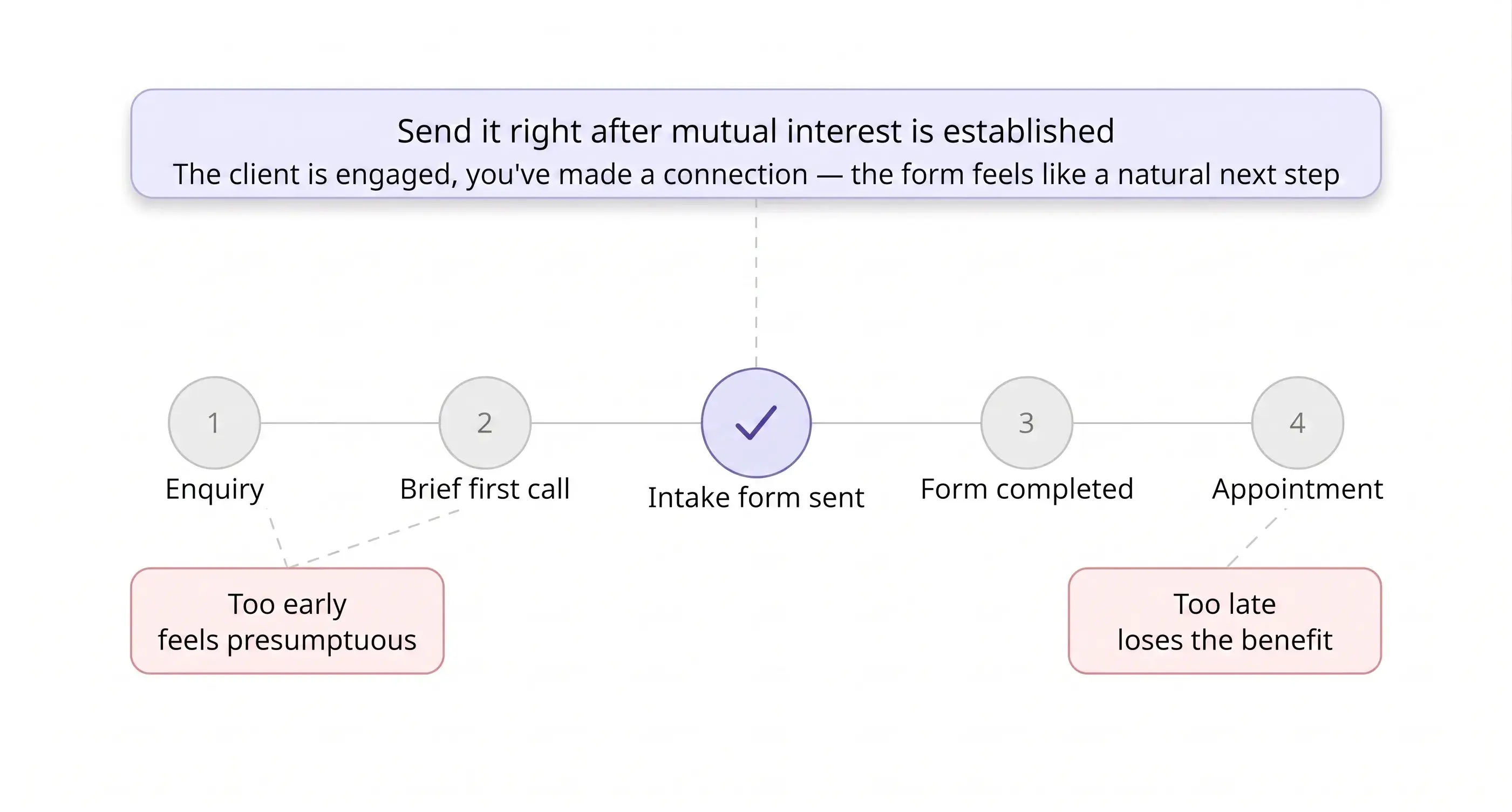
Many professionals skip online intake forms because they miss the right moment to send the form.
Send it too early in the process and it can feel presumptuous, like you're asking for a lot of information from someone who just made an enquiry. Send it too late and you lose the benefit of having it before your first real conversation.
The right moment for most service businesses is immediately after an initial enquiry or after a brief first call where you've established mutual interest. At that point, the client is engaged, you've made a connection, and the form feels like a natural next step rather than a bureaucratic hurdle.
How you send it matters too. A link in an email works. A link in a booking confirmation works evem better, as it's contextual and expected. For in-person businesses like clinics, fitness studios, or beauty practices, a QR code displayed at reception or included in an appointment reminder text is often the fastest path to completion.
The format should match your audience. If most of your clients are filling out forms on their phones (for healthcare and service businesses, that's often the majority) a form that's hard to navigate on mobile will hurt your completion rate regardless of how good the questions are.
Industry-specific must-haves & questions to ask
Across all industries, every intake form needs: full name, contact details, preferred communication method, how they heard about you, and the reason they're reaching out.
Beyond that, what you need depends on your field:
Medical and healthcare industry: current medications, known allergies, reason for visit, insurance information (if applicable), emergency contact, and consent to treatment. According to Dialog Health, Paper forms in this context drive 61% of insurance claim denials through transcription errors.
*For US healthcare providers collecting protected health information, HIPAA compliance is a separate and specific legal requirement. Although not all providers are obliged to be HIPAA compliant, HIPAA applies to covered entities, which means healthcare professionals who transmit health information electronically in connection with standard transactions, typically billing insurance.
Generate a patient intake form
Therapy and mental health: presenting concerns, previous therapy or treatment history, emergency contact, and informed consent. A note on trauma history: many practitioners choose not to include trauma-specific questions on the intake form itself, as there's no clinician present to support disclosure. That information is better gathered in the first session.
Generate a therapy intake form
Fitness and personal training: injury and surgery history, current fitness level, health conditions that affect exercise (a PAR-Q or equivalent), fitness goals, and how much time they can commit between sessions.
Generate a personal training intake form
Beauty and esthetics: skin type and concerns, known allergies or sensitivities, current medications or topicals (including retinoids and prescription products that affect treatment), and consent to treatment.
Generate an esthetician client intake form
Massage therapy: reason for visit and treatment goals, current medications, relevant medical conditions and recent surgeries, skin conditions or allergies to oils and fragrances, pregnancy status, DVT or blood clot history, pressure preferences, areas to focus on or avoid, and informed consent. If you want to dive deeper into the topic forms for massage practitioners, here' a full guide to massage therapy intake forms.
Generate a massage intake form
Coaching and consulting business or personal context, primary goals, what they've already tried, timeline, budget, and who else is involved in the decision. For coaches, asking about previous coaching experience and how it went reveals both expectations and potential red flags before the relationship starts.
Generate a coaching intake form
Contractors and consulting: project address, description of work, expected timeframe, where they are in the process (permits, financing, design decisions), names and contact details of all decision-makers, and how they heard about you.
Generate a consulting client intake form
Free intake form templates
AI form generators give you more flexibility to immediately customise an intake form to your exact use case. However, if you're used to working with templates, Weavely also offers a collection of free intake forms.
Each template is pre-built for a specific industry and ready to share in minutes. Start with the structure, then customise the questions if needed, add branding and logic to match your practice. No starting from scratch required!
Examples of Weavely's intake form templates:
- Patient intake form template
- Therapy intake form template
- Coaching intake form template
- Esthetician intake form template
- Project intake form template
- Counseling intake form template
- Client intake form template
- Massage intake form template
- Animal shelter intake form template
Weavely - your free intake form generator
Weavely is a free AI form builder that generates intake forms for any industry from a single prompt. Describe your practice and what you need to collect, and it produces a structured, branded, ready-to-share form in seconds. Every form includes conditional logic, file uploads, e-signatures, and multi-step flows, all on the free plan.

Tatiana is the Growth Marketing Manager at Weavely, where she's spent nearly four years running marketing end to end. From campaign strategy to the SEO content that brings new readers to the platform. Working day to day on a form builder gives her a front-row seat to what actually makes forms, surveys, and landing pages convert, and that's what she writes about here: practical, tested advice on lead generation and form design. Before Weavely, she led brand and SEO work at Digital Leap and cut her teeth on B2B and B2C content at Ruddy. She's based in Brussels.


