How to Add Signatures, Conditional Logic and Other Advanced Features to Google Forms
Importing Google Forms into Weavely takes less than 60 seconds and unlocks powerful features that Google Forms simply doesn't offer. Whether you need electronic signatures, advanced conditional logic, answer piping, or integrations with 100+ apps, Weavely lets you enhance your existing Google Forms without rebuilding from scratch. In this guide, you'll learn exactly how to import your forms and what new capabilities you'll gain access to.
(Reading time: 8 minutes)
Why Import Google Forms to Weavely?
If you've built a complex Google Form with dozens of questions, the last thing you want to do is rebuild it from scratch in another tool. But what if your form needs electronic signatures for legal compliance? Or advanced conditional logic that goes beyond basic section jumping? Or payment collection for registration fees? Google Forms can't handle these scenarios natively, and that's where importing to Weavely comes in. You keep all your existing work (every question, option, and validation rule transfers automatically) while gaining access to powerful features that Google Forms simply doesn't offer. It's the best of both worlds: zero rebuilding time, maximum capability.
Google Forms Limitations
- ❌ No native signature fields (must use clunky third-party add-ons)
- ❌ Basic conditional logic only (simple section branching, no multi-condition rules)
- ❌ No answer piping or question personalization
- ❌ Limited integration options (mainly Google ecosystem)
- ❌ No payment collection capabilities
- ❌ Restricted customization and branding options
- ❌ No HTML embedding in questions
- ❌ Limited field types (no sliders, rating components, etc.)
What You Keep from Your Google Form After Importing
When you import your Google Form into Weavely, everything transfers over seamlessly, including all question types (short answer, paragraph, multiple choice, checkboxes, dropdown, linear scale, multiple choice grid, checkbox grid, date, time), question text and descriptions, required field settings, validation rules, section titles and breaks, multiple choice options and values. The only element that doesn't transfer is your visual theme, but Weavely offers far more design customization options anyway.
How to Import Google Forms: Step-by-Step Tutorial
Ok, if you're still reading it means we're ready to get going. Here are three simple steps to import your Google Form into Weavely AI.
Step 1: Get Your Google Form Link
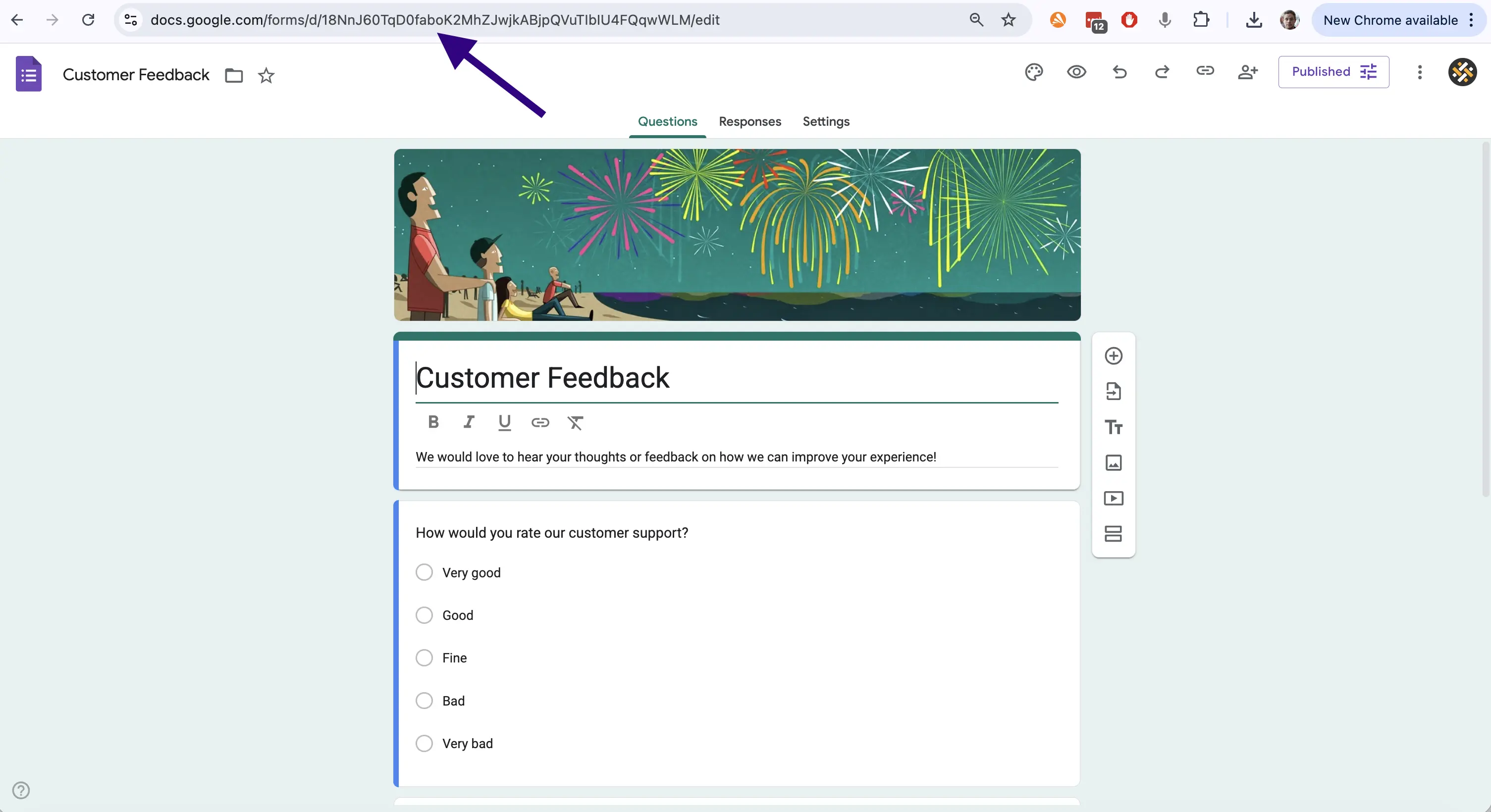
The first step is to get a shareable link from your Google Form. This might sound obvious, but it's important you use the "edit" link. In other words, the link you'll find in your browser's navigation bar.
Step 2: Connect Weavely to Google Forms
.webp)
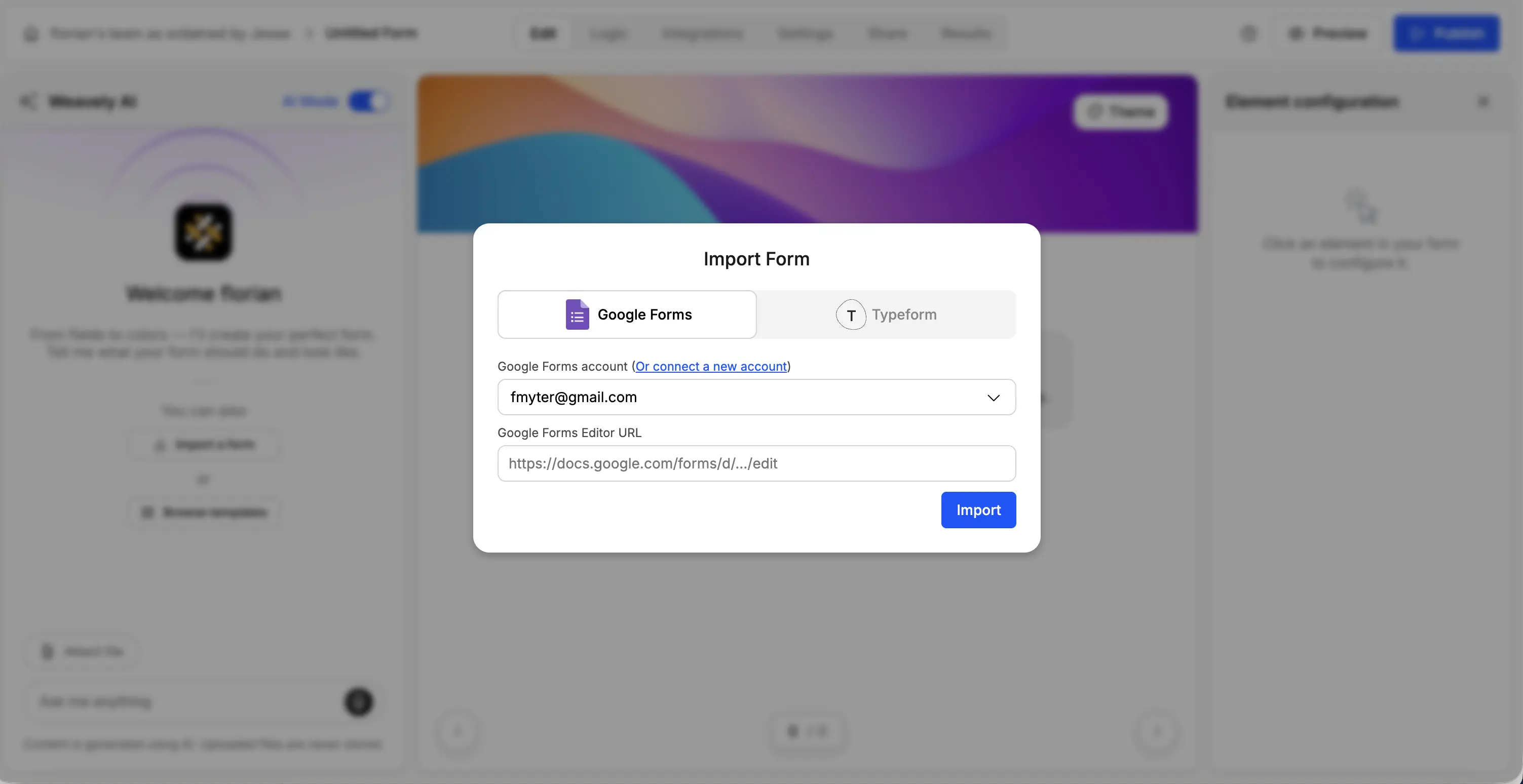
To import your Google Form, you'll need to connect your Google account. Click "Connect to Google Forms" in the import modal and follow the single sign-on process.
Make sure to connect the Google account which you used to create the form you want to import.
Step 3: Import Your Form into Weavely
Once your account is connected you can go ahead and import your form. You'll need your Google Forms' edit URL from step 1.
Step 4: Review Your Imported Form
That's it, your Google Form will automatically get imported. You can now review whether everything has been imported correctly, and tweak it further using Weavely's built-in AI functionality (or just stick to the plain old manual interface). Once you're satisfied you can move ahead and start adding the functionality you've been missing in Google Forms.
What You Can Add After Importing
Now comes the exciting part. Your Google Form is now in Weavely, which means you can enhance it with features that Google Forms simply doesn't offer. Here are the most popular additions:
1. Electronic Signature Fields

Google Forms has no native way to collect electronic signatures, you'd need to rely on third-party add-ons that are often clunky and expensive. Weavely's signature field lets respondents sign directly in your form using their mouse, trackpad, or finger on mobile devices. The signature is captured as an image and stored with their form response.
Learn more about collecting signatures with Google Forms in our detailed guide.
2. Advanced Conditional Logic
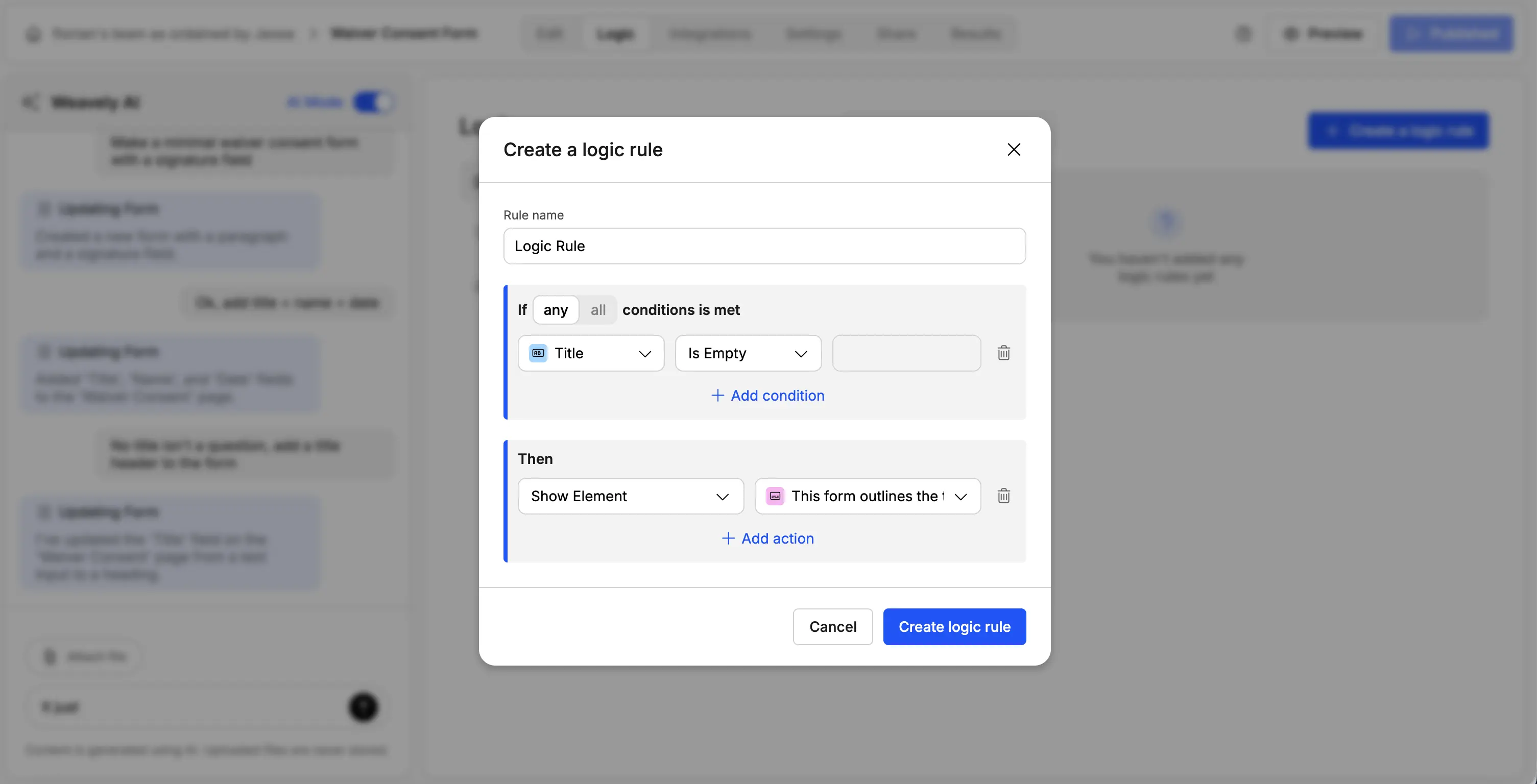
Google Forms offers basic conditional branching: you can jump to different sections based on a single answer. Weavely takes this much further with advanced multi-condition logic. Advanced conditional logic lets you show, hide, or skip questions based on multiple conditions and previous answers. You can create complex rules like 'Show question 10 only if they answered YES to question 3 AND selected Option A in question 7.' This creates intelligent, adaptive forms that only show relevant questions to each respondent.
For a complete tutorial on advanced conditional logic in Google Forms read our detailed guide.
3. Answer Piping and Dynamic Fields(Question Personalization)
Answer piping is a feature that doesn't exist in Google Forms at all, but it dramatically improves the respondent experience. Answer piping lets you reference previous answers in later questions. If someone enters their name as 'Sarah' in question 1, question 5 can automatically say 'Sarah, what's your biggest challenge with our product?' This personalization makes forms feel conversational rather than robotic, which research shows increases completion rates by up to 20%.
Check out our guide on answer piping if you want to learn how to do this in Weavely.
4. Extensive Integrations
Google Forms integrates primarily with Google Workspace apps (Sheets, Docs, Calendar). Weavely connects to over 100 popular tools through native integrations and Zapier. When someone submits your form, you can automatically trigger actions in your other business tools. Send form responses to your CRM, create tasks in project management software, notify your team in Slack, add subscribers to your email marketing tool, or update databases in real-time.
This eliminates manual data entry and ensures your form responses flow directly into your existing workflows. You can set up multiple integrations for a single form, creating complex automation sequences. You can see an overview of integrations and how they work here.
5. Other Enhanced Features
Finally, Weavely provides a bunch of smaller improvements over Google Forms which make your forms that much more powerful and enjoyable to fill in. For example:
Custom HTML Embedding: Embed custom HTML, CSS, or JavaScript in your questions for interactive elements, or custom widgets that Google Forms can't support.
Slider Fields: Replace linear scales with visual sliders for more engaging numerical inputs (1-10 ratings, budgets, age ranges, etc.).
Advanced File Uploads:More flexible file upload options with drag-and-drop, multiple file types, and larger file size limits.
Better Design Customization: Full control over colors, fonts, layouts, spacing, and branding. Remove Weavely branding on paid plans for completely white-labeled forms.
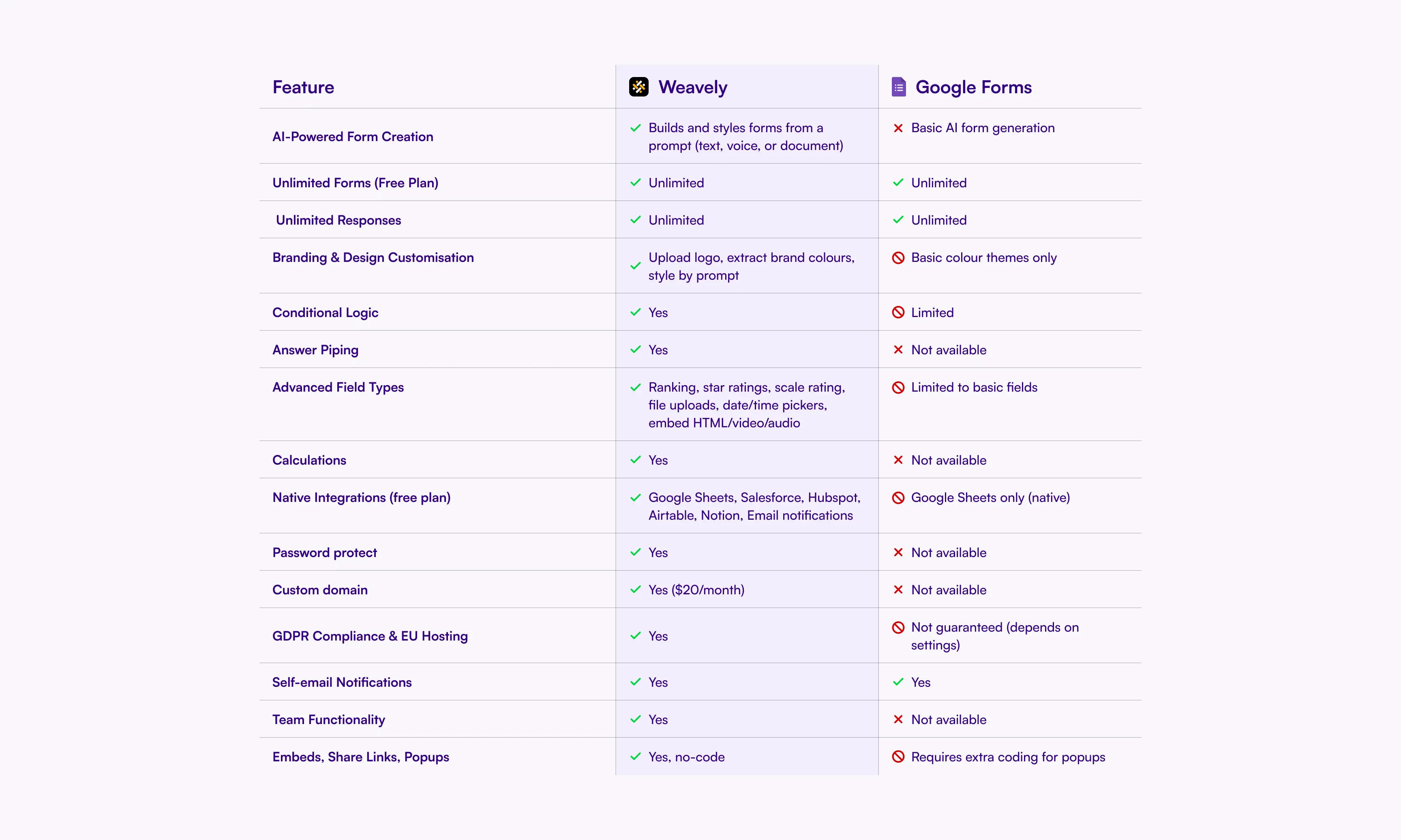
Google Forms vs. Weavely: Feature Comparison
In case you're not convinced yet, here's a side-by-side comparison on how Weavely AI and Google Forms compare when it comes to features.
Frequently Asked Questions
Can you add a signature to Google Forms?
No, Google Forms does not have a native signature field. However, when you import your Google Form into Weavely, you can add electronic signature fields that work on desktop and mobile. This is perfect for waivers, contracts, consent forms, and legal documents.
Does Google Forms have conditional logic?
Google Forms has basic section branching, but cannot show/hide individual questions or use multiple conditions. Weavely offers advanced conditional logic with AND/OR operators and the ability to show/hide any question based on previous answers.
How long does it take to import a Google Form?
Importing a Google Form into Weavely takes 5-10 seconds regardless of form size. All question types, multiple choice options, required fields, validation rules, and section breaks transfer automatically. Only the visual theme doesn't transfer, giving you a clean slate for better design customization.

Florian is the co-founder and CEO of Weavely, where he does a bit of everything: from product and fundraising to making YouTube videos and writing for the blog. He holds a PhD in computer science and sits on the board of No Code Belgium, the country's no-code community, after more than seven years as a researcher and business developer at Vrije Universiteit Brussel. He writes the hands-on tutorials here, drawing on both an academic background and the day-to-day reality of building a form tool from the ground up. Based in Brussels.


