What to Include in a Travel Reimbursement Form (and How to Build One Fast)
According to the Global Business Travel Association, 19% of all expense reports contain errors. Each one takes an additional 18 minutes to fix. If you're processing even a handful of travel reimbursement forms per month, that's a lot of time spent on what should be a boring, solved problem.
And yet, here we are. The problem usually starts with the form itself. Missing fields, vague categories, no receipt requirements. These gaps create disputes at reimbursement time and headaches at tax time. With the IRS mileage rate increasing to 72.5 cents per mile for 2026 (up from 70 cents in 2025), getting your travel reimbursement form right is more important than ever.
This guide covers exactly what fields belong on a travel reimbursement form, how mileage forms differ from general expense reports, and how to build one that actually works for your team.
Travel Reimbursement Form vs. Mileage Form vs. Expense Report
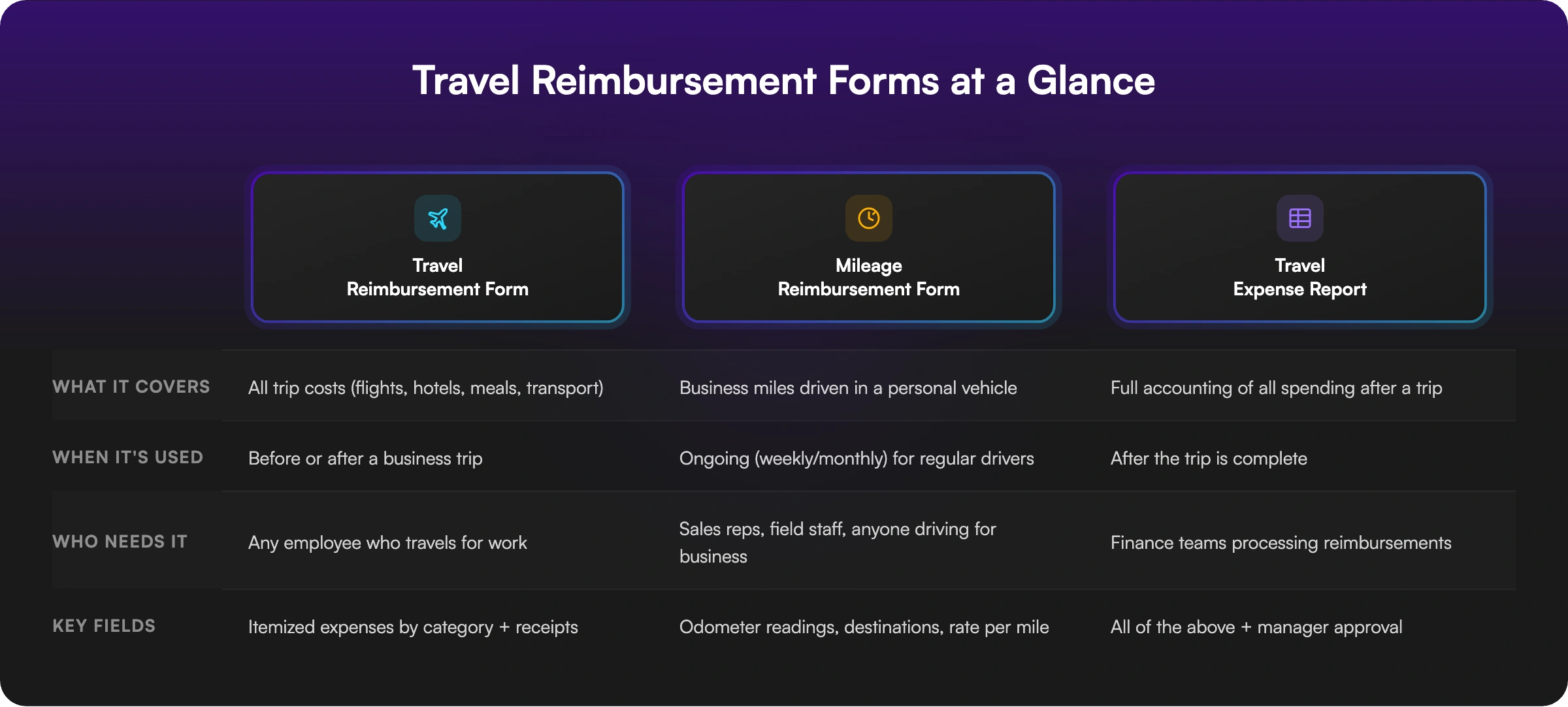
Before we get into the details, it's worth clarifying the differences between these three forms, because people search for all of them and often use the terms interchangeably.
A travel reimbursement form covers all costs from a business trip: flights, hotels, meals, ground transportation, and incidentals. It's the broadest of the three.
A mileage reimbursement form is narrower. It tracks business miles driven in a personal vehicle and calculates reimbursement based on the IRS standard rate (72.5 cents per mile in 2026). Sales reps, field technicians, and anyone driving between job sites use these regularly.
A travel expense report (sometimes called a travel expense report template) is the document employees submit after a trip to account for all spending. It's essentially the completed version of a reimbursement form, often paired with receipts and manager sign-off.
Most small businesses need at least the first two. If your team both travels and drives for work, you'll want a general travel reimbursement form and a separate mileage-specific one.
What Every Travel Reimbursement Form Should Include
A solid travel reimbursement form collects everything your finance team needs to process the request without back-and-forth emails. Here's what to include, section by section.
Employee Information
Start with the basics: full name, department, job title, and employee ID (if applicable). Yes, this seems painfully obvious. But we've seen reimbursement forms come in with nothing but a first name and a pile of receipts. Your finance team shouldn't have to play detective.
Travel Details
This section captures the trip itself: destination, departure and return dates, and the business purpose of the travel. The business purpose field matters more than most people realize. Under IRS accountable plan rules, every reimbursed expense needs a documented business connection. Without it, reimbursements may be treated as taxable wages.
Transportation Costs
Flights, trains, rental cars, rideshares, parking, and tolls all go here. Include a field for each category rather than a single "transportation" line item. Specificity makes approval faster and auditing easier.
Lodging
Hotel costs with check-in and check-out dates. If your company has per-night spending limits, include that cap on the form so employees know upfront what's reimbursable.
Meals
Meals during business travel are reimbursable, though the IRS only allows employers to deduct 50% of meal costs. Your form should capture individual meal expenses or use the GSA per diem rate for the travel destination. Either way, make the method clear on the form.
Mileage (If Applicable)
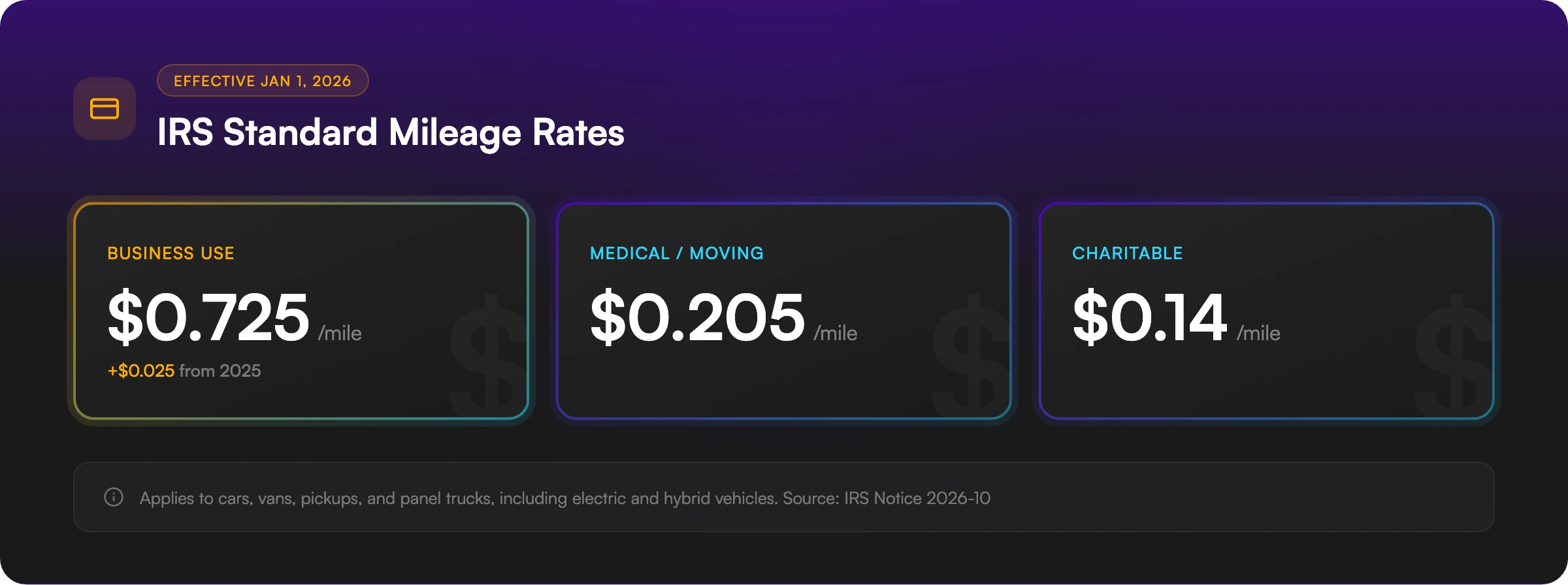
If the trip involved driving a personal vehicle, include odometer start and end readings, total miles, and the reimbursement rate. At the 2026 IRS rate of $0.725 per mile, an employee driving 200 business miles would be reimbursed $145. Some companies build the rate calculation directly into the form to avoid math errors.
Receipt Attachment
Add a file upload field for receipts. We cannot stress this enough. The IRS requires documentation for all lodging expenses regardless of amount, and for any other expense over $75. Making receipt uploads part of the submission process, rather than a separate step, cuts down on the "I'll send those later" emails that never actually arrive.
Approval
At minimum, include a field for the approving manager's name. Some companies add a signature or date field. For a lightweight approach, the form itself doesn't need to handle the full approval workflow. It just needs to capture who authorized the reimbursement.
What to Include on a Mileage-Specific Form
If you need a standalone mileage reimbursement form for employees who drive regularly (not just on occasional trips), keep it focused:
- Employee name and department
- Date of each trip
- Starting location and destination
- Odometer reading (start and end) or total miles
- Business purpose for each trip
- Reimbursement rate per mile
- Calculated total
The key detail most forms miss: requiring odometer readings or a mileage tracking log for each trip rather than just a total at the end of the month. Individual trip records hold up much better if your company is ever audited.
For employees in California, mileage reimbursement is mandatory under Labor Code Section 2802. The state doesn't set its own rate, but most employers use the IRS standard rate as a benchmark. If you have California-based employees, make sure your form and policy reflect this legal requirement.
Connecting Your Form to an Approval Process
The form is the collection layer. It captures what was spent and why. But you still need a way for managers to review and approve submissions.
Two common approaches work well for small and mid-size teams:
Simple: Include a manager name and signature field directly on the form. When the employee submits, the manager reviews the attached receipts and signs off. This works for companies processing a few reimbursement requests per month.
Automated: Connect your form to Google Sheets so every submission lands in a shared spreadsheet the finance team or manager can review. From there, you can use Zapier, Make, or n8n to trigger email notifications when a new submission comes in, flag high-dollar requests, or route approvals to the right person. This is a better fit once you're handling more than a handful of requests per week.
The point is that the form doesn't need to be a full workflow tool. It needs to collect the right data cleanly, and then plug into whatever review process your company already uses.
Building Your Travel Reimbursement Form with AI
Ok, so you know what fields to include. Now you need to actually build the thing. If you're starting from scratch, building a travel reimbursement form manually, adding fields one by one in Google Forms or Typeform, takes more time than it should. These tools work, but they're generic. You'll spend time configuring field types, adding descriptions, and organizing sections for something that should take about 30 seconds to set up.
With Weavely's AI travel reimbursement form generator, you describe what you need and the form builds itself. For example, you could type:
"Create a travel reimbursement form with sections for employee info, travel dates and purpose, transportation costs, lodging, meals, mileage with the 2026 IRS rate, receipt uploads, and manager approval. Use a clean, professional design."
Weavely generates the complete form in seconds with the right field types already in place: date pickers for travel dates, number fields for costs, file uploads for receipts. You can customize anything afterward through conversation: add fields, change labels, adjust styling.
Once your form is ready, share it via link, embed it on your company intranet, or distribute it through email. Responses are collected automatically, and you can sync them to Google Sheets for easy tracking and reporting. For companies using tools like Zapier or n8n, you can set up automatic notifications when a new reimbursement request comes in.
You can also build a dedicated mileage reimbursement form or a travel expense report template the same way. Just describe the fields you need.
Common Mistakes to Avoid
We see the same issues come up again and again. Most of them are easy to fix once you know they exist.
No receipt requirement. If your form doesn't explicitly ask for receipt uploads, employees will forget. Every single time. Then your finance team spends time chasing documentation after the fact.
Using outdated mileage rates. The IRS updates mileage rates annually. For 2026, the business rate is 72.5 cents per mile. Using last year's rate means you're either under-reimbursing employees or overpaying (and the excess becomes taxable).
No written reimbursement policy. A form without a policy is incomplete. Employees need to know what's reimbursable, what the spending limits are, and how quickly they need to submit. The IRS considers expenses submitted within 60 days of the trip to be within a reasonable timeframe.
Skipping the business purpose field. Under IRS accountable plan rules, reimbursements without a documented business purpose can be reclassified as taxable wages. This one field protects both the company and the employee.
Frequently Asked Questions
Is travel reimbursement considered taxable income?
Generally, no. Under an IRS accountable plan, travel reimbursements are excluded from an employee's taxable income as long as three conditions are met: the expense has a business connection, the employee provides adequate documentation (typically within 60 days), and any excess reimbursement is returned within 120 days. If these requirements aren't met, the reimbursement gets treated as taxable wages and reported on the employee's W-2.
Do I need a written travel reimbursement policy?
It's strongly recommended. A written policy clarifies which expenses are reimbursable, sets spending limits, establishes submission deadlines, and defines the approval process. It also helps your company meet IRS accountable plan requirements. Without one, you risk inconsistent reimbursements and potential compliance issues during an audit.
How does mileage reimbursement calculation work?
Multiply the number of business miles driven by the IRS standard mileage rate. For 2026, that rate is 72.5 cents per mile. So 150 business miles would equal a $108.75 reimbursement. This rate covers gas, maintenance, depreciation, and insurance, so employees shouldn't claim these costs separately if using the standard rate. Keep a log of each trip with dates, destinations, and odometer readings.
Are there California-specific rules for travel reimbursement?
Yes. California Labor Code Section 2802 requires employers to reimburse employees for all necessary business expenses, including mileage. Unlike federal law, this isn't optional. California employers must cover the cost of using a personal vehicle for work. Most employers use the IRS standard mileage rate as a reasonable benchmark, but the reimbursement must genuinely reflect actual driving costs. Failure to reimburse can lead to lawsuits and penalties.
How do I fill out a mileage reimbursement form?
Record each business trip separately with the date, starting location, destination, and either odometer readings or total miles driven. Multiply total miles by your company's per-mile rate (or the IRS rate of $0.725 for 2026). Note the business purpose for each trip. Don't include your regular commute. Only miles driven for work-related activities like client meetings, site visits, or errands qualify.
Get Started
A well-designed travel reimbursement form saves your team time, keeps you compliant with IRS rules, and reduces the back-and-forth that slows down reimbursements. Whether you need a general travel expense form, a mileage-specific tracker, or a full travel request form, you can generate one with AI in seconds. No manual field-by-field setup required.

Tatiana is the Growth Marketing Manager at Weavely, where she's spent nearly four years running marketing end to end. From campaign strategy to the SEO content that brings new readers to the platform. Working day to day on a form builder gives her a front-row seat to what actually makes forms, surveys, and landing pages convert, and that's what she writes about here: practical, tested advice on lead generation and form design. Before Weavely, she led brand and SEO work at Digital Leap and cut her teeth on B2B and B2C content at Ruddy. She's based in Brussels.


