Introducing Weavely: why we built yet another form builder (and why it’s different)

We're thrilled to officially introduce Weavely to the world! Weavely is an AI-powered form builder designed to eliminate the friction and guesswork of traditional form creation.
“Yet another form builder,” we hear you say. And you’re not wrong, the market is full of tools for creating forms of every shape and size. But we built Weavely for a reason. When we surveyed over 350 professionals, 60% told us they struggle with one key thing: coming up with the right questions. Brainstorming, phrasing them clearly, avoiding bias, and making sure they actually deliver useful insights.
So we asked ourselves: why go to ChatGPT to figure out what questions to ask, and then switch back to a traditional form builder to build the thing? Why not create a tool that does both — an AI-powered form tool that’s trained on survey best practices and can generate a full form or survey with logic and beautiful design from a single prompt.
If you're like the 60% of our respondents who get stuck writing survey questions and find manual form building frustrating, Weavely is here to change that. It makes the whole data collection process faster, more intuitive, and, dare we say, actually enjoyable - all thanks to AI-powered form automation.
From Idea to Form in Seconds
At the heart of Weavely is a simple concept: a conversational interface that lets you handle everything from form generation to design, form logic and data analytics by simply chatting. Just describe what you need, and we'll generate a form for you. Whether you're collecting customer feedback, building an event registration form, or a lead-gen questionnaire, our AI form builder turns your prompt into a complete custom form in seconds.
AI Form Generation
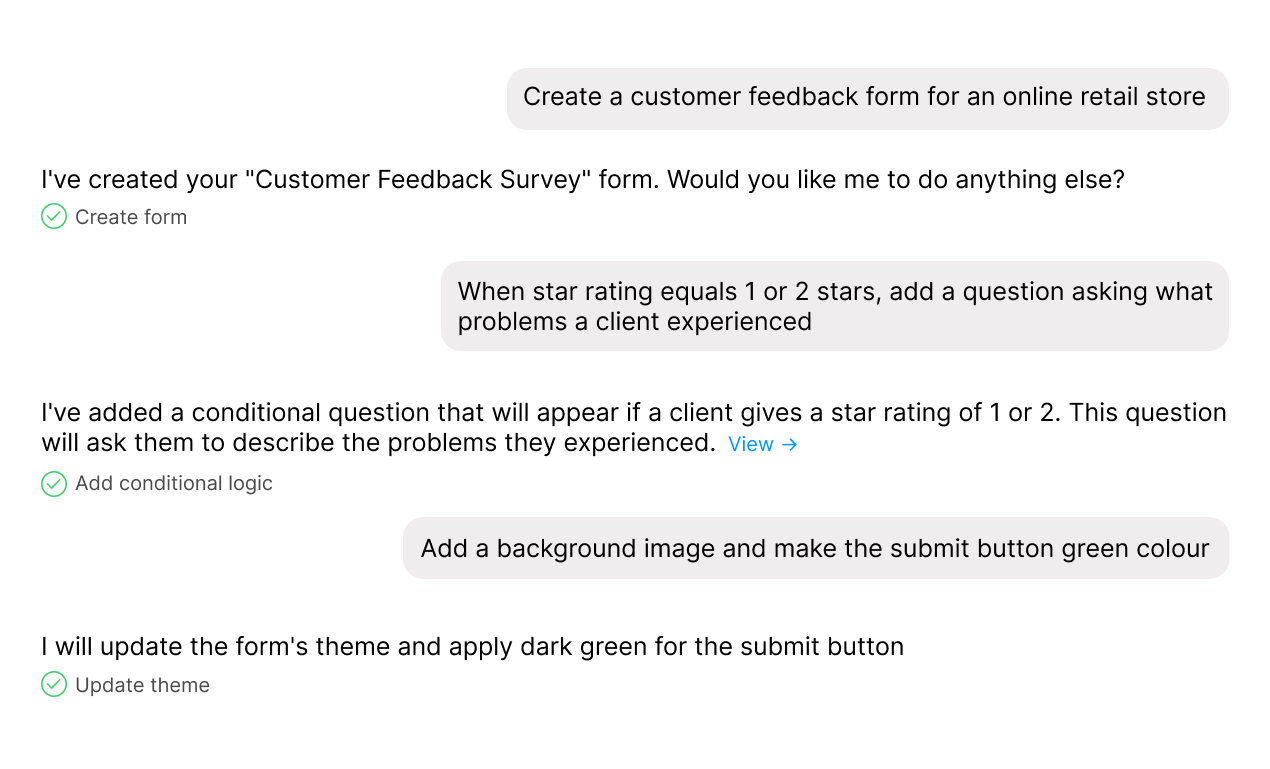
With Weavely, you can create a form by providing a prompt in multiple formats - type it, speak it out loud, or even upload a document/slide deck/image. For example, if you already have some questions brainstormed and written down in a PDF file, just feed it into our AI form generator, and it will instantly turn your PDF into a form.
What's more, you can even turn your Google Doc into a form, just in a few clicks.
Or maybe you have a form built in Google Forms but you are lacking certain customisation features, such as advanced conditional logic or password protection? In this case, you can use our Google Forms import feature. All you need to do is to paste a link to your Google Form, and the AI will turn it into a fully editable version within Weavely. This will let you build on what you already have but with more control and customisation.
Weavely's AI capabilities are not limited to just form generation. You can ask to make any sorts of changes and apply various advanced features. For example, Weavely can handle conditional logic, answer piping, design customisation, data analytics, and much more.
In this quick video walkthrough, we show how to go from an idea to a working online form in less than a minute:
Sharing Options
Weavely offers several ways to share your forms, depending on how and where you want them to appear. You can simply copy a link and send it anywhere, embed it directly on your website, or even set it to pop up at just the right moment. For instance, make you form appear in the bottom right of the web page after a user scrolls or spends time on a page. In addition, you can generate a QR code from your form without having to use a third-party tool.
Branded Design with Less Effort
Good forms should look good. With AI, styling forms and surveys has become practically effortless. Weavely's AI helps you granularly customize your forms and surveys by instantly applying your brand’s look and feel. This way, you don't even need to touch a single colour picker or font dropdown. Just upload your logo or an image from your brand, and Weavely will automatically extract the relevant colours and typography to create a cohesive, on-brand design.
Or you can simply describe the style you envision. For example, write short prompt like “modern and minimal” or “friendly and playful,” and Weavely will adjust the design to reflect this aesthetic. You can also combine the best of both worlds, by uploading an image with brand colours or a logo and additionally providing design guidelines.
Additionally, for teams who need consistency in their form design, we created a feature where you can save your brand style, and it will be applied to all forms across your team.

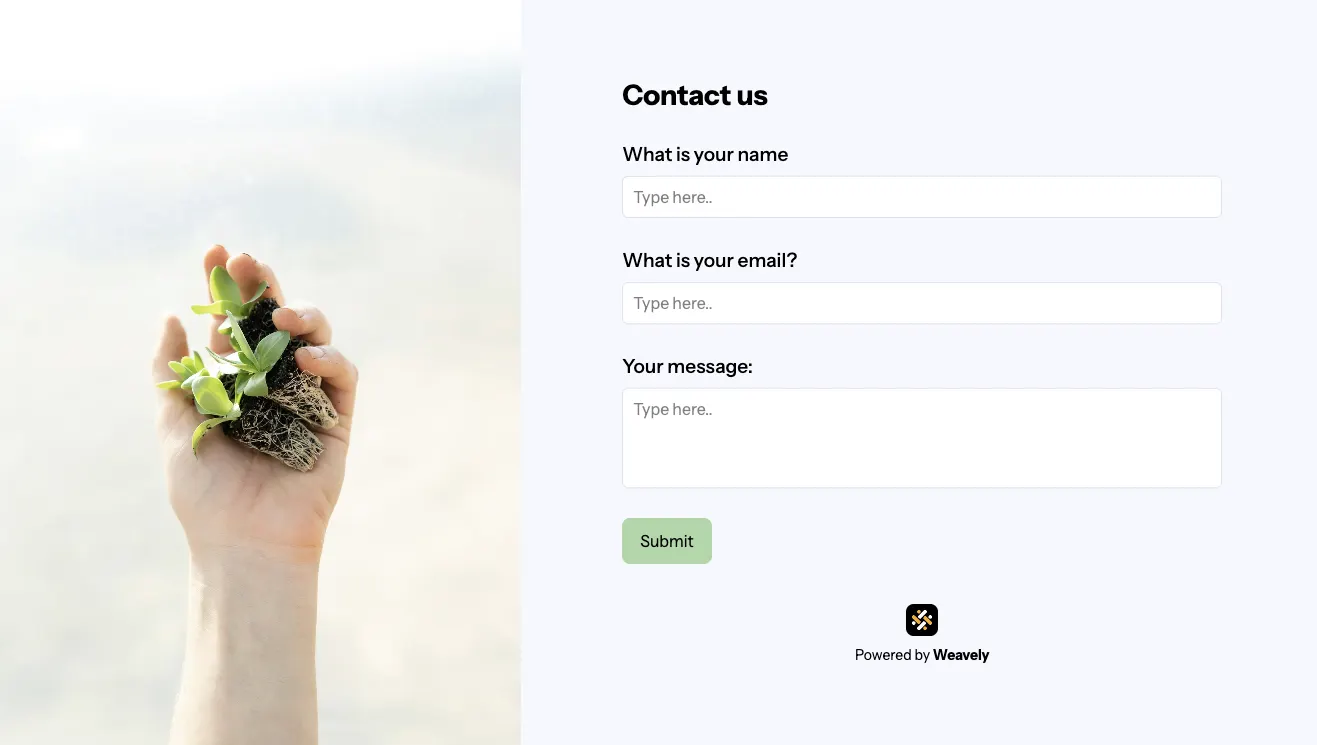
For example, in the image above we uploaded a screenshot with a branded colour palette, and provided directions on fonts and style in the text prompt. Here is the result — a stylish minimalist contact form:
Forms for Every Team, Every Use Case
Initially, we were building Weavely with marketers and customer success teams in mind, people who rely on fast, high-quality feedback forms but don’t want to spend hours fiddling with form fields.
But it's not just for feedback or lead generation. Weavely is built to handle any use case where a form is involved, from a simple contact and event registration forms to product discovery and onboarding flows. If it involves asking questions or collecting input, Weavely can help you easily create forms and surveys — faster, smarter, and better-looking.
We’ve already heard from hundreds of users that writing forms is often the slowest, most frustrating part of collecting insights. So Weavely aims to flip that!
Integrations

Weavely integrates with dozens of tools. This way, form submissions can automatically trigger updates in your workflows.
With just a few clicks, you can connect your forms to platforms like:
- Google Sheets – log responses in real time
- Email – trigger notifications or confirmations
- HubSpot & Salesforce – add contacts or update CRM records automatically
- Notion & Airtable – send data straight into structured databases
And yes, Salesforce integration is available for free, with no need for an upgraded plan. Whether you’re capturing leads, handling event registrations, or automating internal requests, Weavely makes sure the data flows exactly where you need it, without manual copy-pasting.
More integrations are on the way. We’re building them based on user requests — so if there’s something you’d love to see, let us know!
Results and Analytics

For when your responses are in, Weavely offers built-in data analytics. Our AI analytics help you sort data, explore patterns, segment audiences, and generate summaries and charts with a single prompt.
Free to Use — Upgrade Only If You Need To
Weavely offers most of its functionality for free, and is perfect for those looking for an affordable AI form builder. In fact, you will only need to upgrade if you want to benefit from custom branding, such as removing the banner, adding a custom domain and social media preview.
You can create unlimited forms, collect unlimited responses, and use integrations like Salesforce, HubSpot, Notion, Make, and more without paying a cent!
And best of all, you don’t even need to create an account to try it out. Just jump in and see what our AI form maker can do! 👉 Try Weavely
Let us know what works, what doesn’t, and what would make it even better for your workflow. Because better questions lead to better answers, and Weavely is here to make asking those questions as easy as possible.

Tatiana is the Growth Marketing Manager at Weavely, where she's spent nearly four years running marketing end to end. From campaign strategy to the SEO content that brings new readers to the platform. Working day to day on a form builder gives her a front-row seat to what actually makes forms, surveys, and landing pages convert, and that's what she writes about here: practical, tested advice on lead generation and form design. Before Weavely, she led brand and SEO work at Digital Leap and cut her teeth on B2B and B2C content at Ruddy. She's based in Brussels.


