Revolut Payment Link: How to Collect Revolut QR Code Payments with a Weavely Form
Key Takeaways
- Weavely does not process payments. You embed a Revolut payment link or QR code in your form, and Revolut handles the actual transaction on its own secure payment page.
- Revolut is an FCA-authorised company regulated in the UK, which adds trust and security for users of payment links.
- Revolut employs strong encryption, fraud monitoring, and safeguarding measures to ensure a secure payment experience.
- Revolut charges a fee of 1% + £0.20 for online payments made through payment links.
- The personal Revolut payment QR code works for anyone, even people who don’t have a Revolut account. They can pay by card or Apple Pay. There’s a weekly cap on card payments from non-Revolut senders; details below.
- This is a manual workaround, not a native integration. Revolut moves the money; Weavely collects the form responses and proof-of-payment details.
- Best for low-volume use cases: workshop signups, event tickets, club membership fees, donations, and freelancer invoices.
- The tutorial covers: creating your Revolut payment link or QR code, generating a Weavely form with AI, embedding the payment details, and tracking who has paid.
What Is a Revolut Payment Link (and Why Put It in a Form)?
A Revolut payment link is a secure URL you can share so people can pay you without seeing your bank account number or card details. When someone opens the link (or scans the matching QR code), they land on a Revolut-hosted secure payment page, which uses strong security measures like encryption and fraud monitoring to protect your information during the transaction.
You might also see this feature called a Revolut payment request, a Revolut QR code payment, or a Revolut Business payment link. They all route the payer to the same secure checkout flow. The link and the QR code are two formats of the same thing: the QR is just a scannable version of the URL.
The important part for collecting payments through a form: non-Revolut users can pay too. If you open the Revolut app and tap your profile, you’ll see your personal payment QR code with the message “Scan to get paid by anyone, even if they’re not on Revolut.” That’s the feature this article builds on.
Links are a secure and convenient way to collect payments, and the payment process completes automatically once the recipient pays. Customers can pay in over 35 different currencies, making international transactions easy.
Here’s the problem this solves. Revolut doesn’t provide forms. Google Forms doesn’t accept payments. So if you’re running a workshop or collecting club dues, you end up sending two separate things (a payment link in one message, a registration form in another), and then manually matching who paid what against who signed up.
Weavely closes that gap. It’s an AI-powered form builder that collects responses (names, emails, choices, file uploads) but never touches money. You create a payment link or QR code inside Revolut, drop it into your Weavely form, and ask respondents to confirm their payment. One link, one workflow.
When to Use a Revolut Payment Link Inside a Weavely Form
This setup works best for small-scale, occasional payments where you need both registration data and money in one place. Practical use cases include:
- Event registrations: yoga workshops in Dublin, pottery classes in Prague, photography workshops in Berlin
- Community fundraisers: church trips, school clubs, charity collections
- Membership dues: sports clubs, hobby groups, co-working spaces
- Freelancer bookings: design consultations, language tutoring, remote coaching
- In-person events: displaying a printed Revolut barcode at the entrance while guests fill out the form on their phones
- Small business invoicing: collecting deposits or prepayments alongside an intake form. Businesses can send payment links through email, text, social media, QR codes, or invoices, allowing them to reach customers effectively and significantly streamline the invoicing process.
For heavy e-commerce, recurring subscriptions, or high-volume sales, a full payment gateway like Stripe will serve you better. For one-off and small-batch payments, this combination is fast, free to set up, and familiar to millions of European users.
Which Revolut Account Do You Need?
This is the question most people get stuck on. The short answer: it depends on how much you’re collecting and from whom.
Personal Revolut account (any tier: Standard, Plus, Premium, Metal, or Ultra). Free. The personal payment QR code works for low-volume collection from a mix of Revolut and non-Revolut payers. The catch: there’s a weekly cap on card payments from non-Revolut senders (currently £250 in the UK, or the local currency equivalent in other markets). Check your country’s Revolut help centre for the exact number. Above that, the payer is prompted to create a Revolut account. Good fit for workshops, classes, club fees, small fundraisers, casual freelance work.
Revolut Pro. Free to open and lives inside your personal Revolut app. Built for freelancers, sole traders, and side-hustles. No weekly cap on card payments from non-Revolut customers. Processing fees apply (Revolut’s pricing page lists Pro payment fees starting from 1.5% per transaction; confirm current rates before relying on this). Managing costs is important for businesses using payment links, so always review the latest fees. Good fit for regular freelance invoicing, recurring small events, or side businesses.
Revolut Business. For incorporated companies, partnerships, and certain registered self-employed people. Lives in a separate web and mobile app. More features for team spend, multi-currency, expense management, and higher-volume payment acceptance. Processing fees apply. Revolut Ltd is an FCA-regulated company authorised to provide a range of financial services in the UK, including investment services and insurance, to businesses. The company is regulated and authorised to offer these services, ensuring compliance and credibility. There is a maximum limit of £50,000 (or the currency equivalent) that can be received from a single payment link into a Revolut merchant account.
If you’re just starting and unsure, begin with a personal account. You can upgrade to Pro inside the same app in a few taps once you outgrow the limits.
Step 1: Create Your Revolut Payment Link or QR Code
Revolut’s interface changes regularly, so the instructions below are intentionally high-level. For exact, current screenshots, check Revolut’s official help centre or watch the embedded video above.
The general flow is:
- Open the Revolut app (personal, Pro, or Business) and navigate to the payments or request-money section. Revolut payment links can be created in just a few taps within the Revolut Business app, making it quick and easy for businesses to send or receive payments.
- Tap the option to create a payment link or payment request
- Choose between a fixed amount (for tickets or set fees) or an open amount (useful for donations or tips)
- Set the currency and add a description like “June 2026 Berlin photography workshop”. This makes reconciliation much easier later
- Once created, you’ll see both a shareable URL and a QR code. Both route to the same checkout.
Revolut payment links are part of Revolut's broader payment solutions for businesses, supporting secure, multi-currency transactions. Payment links allow you to collect payments without sharing your bank account details, enhancing security and privacy. Businesses can also customize the checkout page with their brand colors and logos, which can increase conversion rates by up to 10%.
A few things to know before sharing:
- Personal payment links typically expire 10 days after creation if no one pays
- Revolut also offers reusable payment links with custom limits for use cases like recurring class fees
- For non-Revolut payers, the weekly card-payment cap mentioned above applies on personal accounts only
Copy the payment link URL, and if you want the visual version, save the QR code image to your device. You’ll need both (or either) in the next step.
Step 2: Generate Your Weavely Form with AI
Head to weavely.ai and log in or create a free account. Then describe what you need in plain language.
Example prompt:
"Create a registration form for my 15 June 2026 photography workshop in Berlin. Include fields for name, email, phone, preferred time slot, and a field where they can paste their Revolut payment reference."
Weavely generates the full form structure in seconds: fields, labels, validation, layout. No templates to pick, no drag-and-drop, no manual field-by-field building.
Useful fields for a payment-collection form:
- Participant details (name, email, phone)
- Product or ticket selection
- Expected payment amount
- "Have you paid via Revolut?" (Yes / Just about to / Not yet)
- Payment reference or screenshot upload
Add a short heading at the top of the form to make the flow obvious: "Step 1: Fill in this form. Step 2: Pay via Revolut using the link below. Step 3: Confirm your payment in the field at the bottom."
If you want to tweak anything afterwards, you don't rebuild. You just describe the change: "Make the button purple." "Add a dietary restrictions field." "Remove the phone number." Weavely updates the form as you go.
The free plan includes unlimited forms and unlimited responses. The only requirement is a small "generated by Weavely AI" badge on your form.
Step 3: Add Your Revolut Payment Link and QR Code to the Form

Now embed the payment details inside the form so respondents see everything in one place.
You have two options, and you can use both at once:
Option A: paste the Revolut payment link as a clickable URL. Best for people filling out the form on a desktop or laptop, or anyone you’re sending the form to by email. Include the full URL starting with https:// so it becomes a clickable link in the form’s description or info element. When users click the link, they are taken to a secure payment page hosted by Revolut, which uses strong encryption and fraud monitoring to ensure a secure payment experience.
Option B: upload the Revolut QR code as an image. Best for people on mobile or for in-person events with printed signage. Upload the QR code PNG or JPEG to an image element in your form and add a short caption. Scanning the QR code also directs users to the secure payment page.
A clear structure to follow:
- Heading:“How to pay via Revolut”
- Link element:“Click here to pay via Revolut [paste URL]. This opens a secure Revolut-hosted page.”
- Image element: QR code image
- Caption:“Or scan this QR code with your phone camera or Revolut app to pay”
On the secure payment page, recipients can choose from multiple payment methods, including debit/credit cards, bank transfers, or mobile wallets, and can pay in over 25 currencies.
Then walk respondents through the flow:
- Click the link or scan the QR code with your phone
- Confirm the amount and complete the payment on Revolut’s page
- Come back to this form and tick “I’ve paid,” then enter your payment reference
Important caveat: Weavely doesn’t verify the payment happened. The confirmation step relies on what the respondent enters. The reconciliation work happens in Step 5.
Step 4: Capture Proof of Payment Inside the Weavely Form
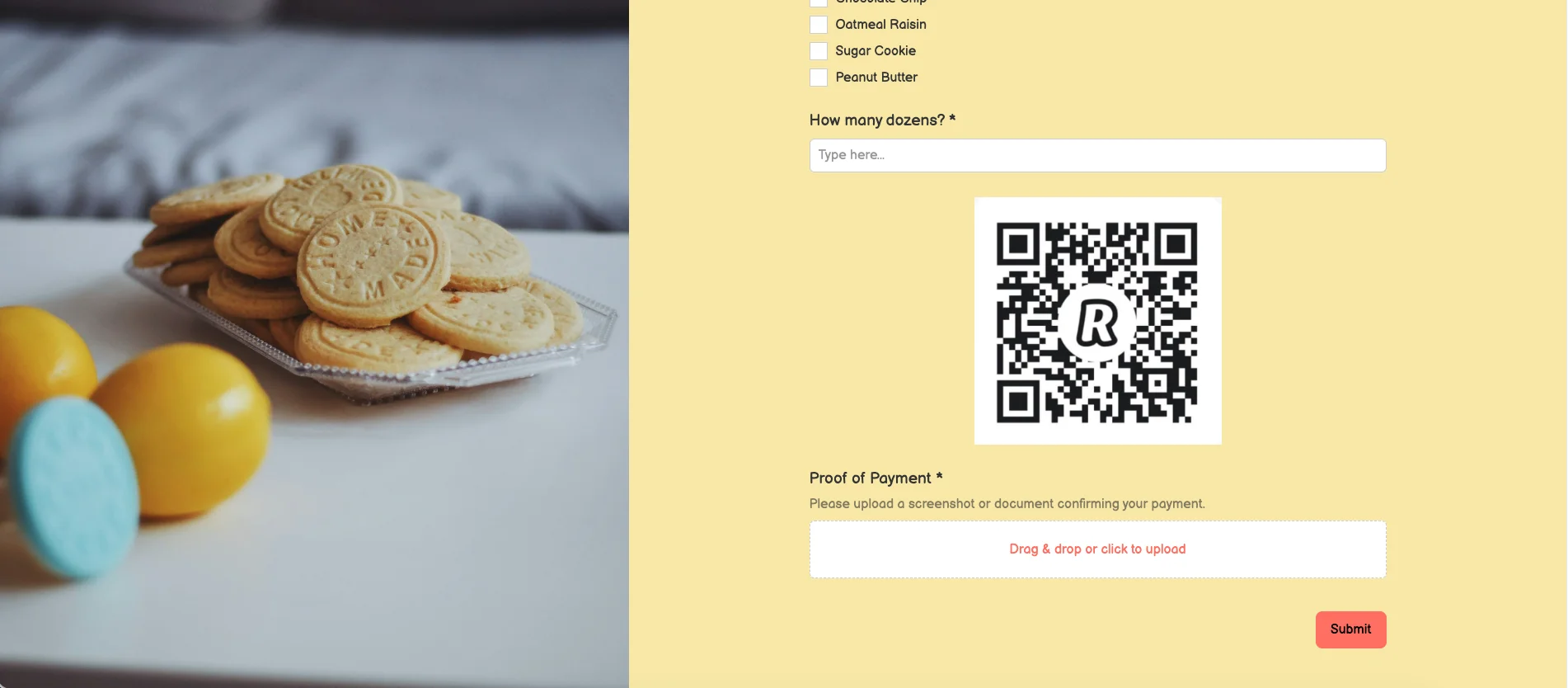
This is where the Weavely side earns its keep, by collecting structured confirmation data tied to each Revolut transaction.
Recommended fields:
- Name used in Revolut (text field). This lets you match the form submission to the Revolut transaction even if the form name differs.
- Payment reference or last 4 digits of the transaction ID (short text)
- Exact amount paid (number field, especially useful if you offered multiple tier options)
- Screenshot of payment confirmation (file upload; optional but useful for disputes)
- Payment status (Yes / Just about to / Not yet). This gives you a clean filter later.
For Revolut Business users, you might also add an internal order ID field if you generate one for each transaction.
This isn't an automated reconciliation system. It's a structured paper trail. With these fields, cross-referencing form submissions against your Revolut transaction history takes seconds rather than minutes.
Handle this data responsibly and follow the data protection rules that apply in your country (GDPR in the EU and UK, equivalent rules elsewhere).
Step 5: Share Your Form and Track Who Has Paid
Publish your Weavely form and share it via whichever channel fits your use case:
- Direct link in emails, WhatsApp groups, or community channels
- Social media posts
- Embedded on your website or event landing page
The reconciliation workflow:
- Periodically check new form responses inside Weavely
- Cross-reference against your Revolut transaction history (or Revolut Pro / Business depending on your account)
- Export responses to a spreadsheet and mark each row as "Paid" once you've matched it
- Filter by your "Have you paid?" field to spot anyone who registered but hasn't paid yet
- Send a follow-up message including the same payment link
Because there's no automated payment confirmation, refunds and payment adjustments have to be handled inside Revolut and noted manually against the matching form response.
Tips and Limitations
A few things to keep in mind before you publish your form:
The weekly cap on non-Revolut card payments. On personal accounts, the cap (£250/week in the UK and a local equivalent elsewhere) applies to you, the recipient, across all your personal payment links combined. If you expect to exceed it, open Revolut Pro before you start collecting.
Processing fees on Pro and Business. Revolut Pro and Business charge a percentage per transaction. Personal accounts don't have processing fees but have the receiving cap above. Check Revolut's current pricing page for the exact figures, since they vary by region, card type, and account type.
Use separate payment links per event. Reconciliation gets much easier when each event has its own link with its own description. Don't reuse one general link for everything.
Test the full flow before sharing. Pay a small amount through your own payment link, submit the form yourself, and check that both appear correctly. Fixing a broken flow after 50 people have used it is painful.
Handle gaps between payment and submission manually. If someone pays but doesn't submit the form, or submits but doesn't pay, you'll need to chase it manually. Clear instructions in the form reduce this significantly but don't eliminate it.
For larger operations or online shops, look at a full Revolut payment gateway integration or another global payments platform. This setup is built for low-to-medium volume.
Conclusion: A Simple Way to Get Paid via Revolut and Keep Your Data Organised
By combining a Revolut payment link or QR code with a Weavely form, you can collect money and structured registration data in a single flow. No coding, no payment gateway setup, no separate tools to wire together. It's a practical workaround for freelancers, event organisers, clubs, schools, and small businesses across Europe.
The flow is straightforward: generate your Revolut payment link or QR code, create a Weavely form with AI, embed the payment details, add proof-of-payment fields, and track responses against your Revolut transactions.
Ready to try it? Create your AI form for free.
FAQ
Can Weavely process Revolut payments for me?
No. Weavely never touches or processes money, and there’s no direct Weavely-Revolut integration. Revolut handles the transaction on its own secure page; Weavely only collects form responses and the payment-confirmation details you ask respondents to enter.
Do I need a Revolut Business account to use payment links in a Weavely form?
Not necessarily. Personal Revolut accounts (any tier) can create payment links and QR codes that work for both Revolut and non-Revolut payers, with a weekly cap on card payments from non-Revolut senders. Creating payment links is free, but transaction fees apply when you receive payment. Revolut Pro removes that cap and is free to open inside the personal app, making it the best choice for freelancers and side-hustles. Revolut Business is for incorporated companies and partnerships. Pick based on your volume and legal structure.
How do I get my Revolut QR code for payments?
Open the Revolut app and either generate a one-off payment request (which produces both a link and a QR code) or use your personal profile QR code, which is always available for receiving payments. The exact menu names change with app updates, so check Revolut’s help centre or the video above for current screenshots.
Can people without a Revolut account pay me?
Yes. The personal Revolut payment QR code includes a checkout option for non-Revolut users to pay by card or Apple Pay. On a personal account, there’s a weekly cap on how much you can receive this way (£250/week in the UK, local equivalent elsewhere). If you need to receive more than that from non-Revolut payers, open Revolut Pro.
Can I accept payments in different currencies with this setup?
Yes. Revolut payment links support multiple currencies; set the currency you want when you create the link. The exact list of supported currencies depends on your country and account type, so check Revolut’s documentation for the current list.
What if someone submits the form but forgets to pay on Revolut?
Filter your Weavely responses by the “Have you paid?” field, then cross-check against your Revolut transaction history. For entries marked “not paid” or with no matching transaction, send a follow-up email with the same payment link. Some no-shows on payment are normal, but clear instructions in the form reduce them significantly.
Is Revolut regulated and where is it based?
Revolut is headquartered in London and is licensed to operate in the UK. The company is registered with UK regulatory authorities, which helps ensure the security and compliance of its financial services.
What services does Revolut offer?
Revolut provides a wide range of services, including banking, payment processing, investment, cryptocurrency, and insurance services. Many of these services are enabled through partnerships with major payment networks like Visa and Mastercard.
What happens if my Revolut account is suspended or there’s an issue?
If there’s a problem with your account, Revolut may review your account for compliance or fraud concerns. This review process helps ensure the safety and legality of transactions. If your account is suspended, follow the instructions provided by Revolut’s customer support to resolve the issue.

Tatiana is the Growth Marketing Manager at Weavely, where she's spent nearly four years running marketing end to end. From campaign strategy to the SEO content that brings new readers to the platform. Working day to day on a form builder gives her a front-row seat to what actually makes forms, surveys, and landing pages convert, and that's what she writes about here: practical, tested advice on lead generation and form design. Before Weavely, she led brand and SEO work at Digital Leap and cut her teeth on B2B and B2C content at Ruddy. She's based in Brussels.


