How to Make a Personality Quiz That Works as a Lead Magnet
People will happily spend two minutes finding out which type of something they are, whether a coffee, a founder, or a houseplant, and then tell their friends the result. That instinct is one of the most underused tools in marketing. A personality quiz looks like fun, but for a business it's a lead magnet: you gate the result behind an email, and the type someone gets becomes a label you can market to.
This post is about the strategy, not the buttons. The walkthrough above shows the build in a couple of minutes; here we cover why personality quizzes convert, the segmentation payoff that most people miss, how to design one that actually works, and the fastest way to create it. The build is the easy part. The thinking is what makes a quiz worth publishing.
Why do personality quizzes convert so well?
Personality quizzes convert because they flip the usual lead-magnet trade. Instead of asking for an email up front in exchange for a PDF nobody opens, you let someone answer a few fun questions first, then ask for their email right before the payoff they now want. By that point they've invested effort, so handing over an email feels small. Quiz lead conversion rates routinely land in the 20–40% range as a result.
The hard numbers back this up. Interact, a quiz platform, reports a 40.1% start-to-lead rate (just over four in ten people who start a quiz become a lead) and a 65% completion rate, figures it says have held steady across more than 80 million leads. Worth being honest about the catch: that 40% is measured against people who chose to start the quiz, a self-selected, high-intent group, as one benchmark analysis points out. It's not a magic conversion rate applied to all your traffic. But even allowing for that, the format consistently beats static gated forms: quiz-style forms convert at roughly 35% versus about 11% for general gated content, and 81% of B2B buyers say they prefer interactive content over static.
Then there's the part a PDF can never do: people share the result. Personality quizzes are consistently the most-shared quiz type, and most quizzes that pass 100,000 shares are personality quizzes. BuzzFeed built a media empire partly on this; its "What city should you actually live in?" quiz passed 20 million views, and "Can we guess your real age?" was taken about 5.9 million times. A result like "I'm a Cold Brew" is something people want to post. Every share is a free, pre-qualified referral.
The real payoff: every result is a segment
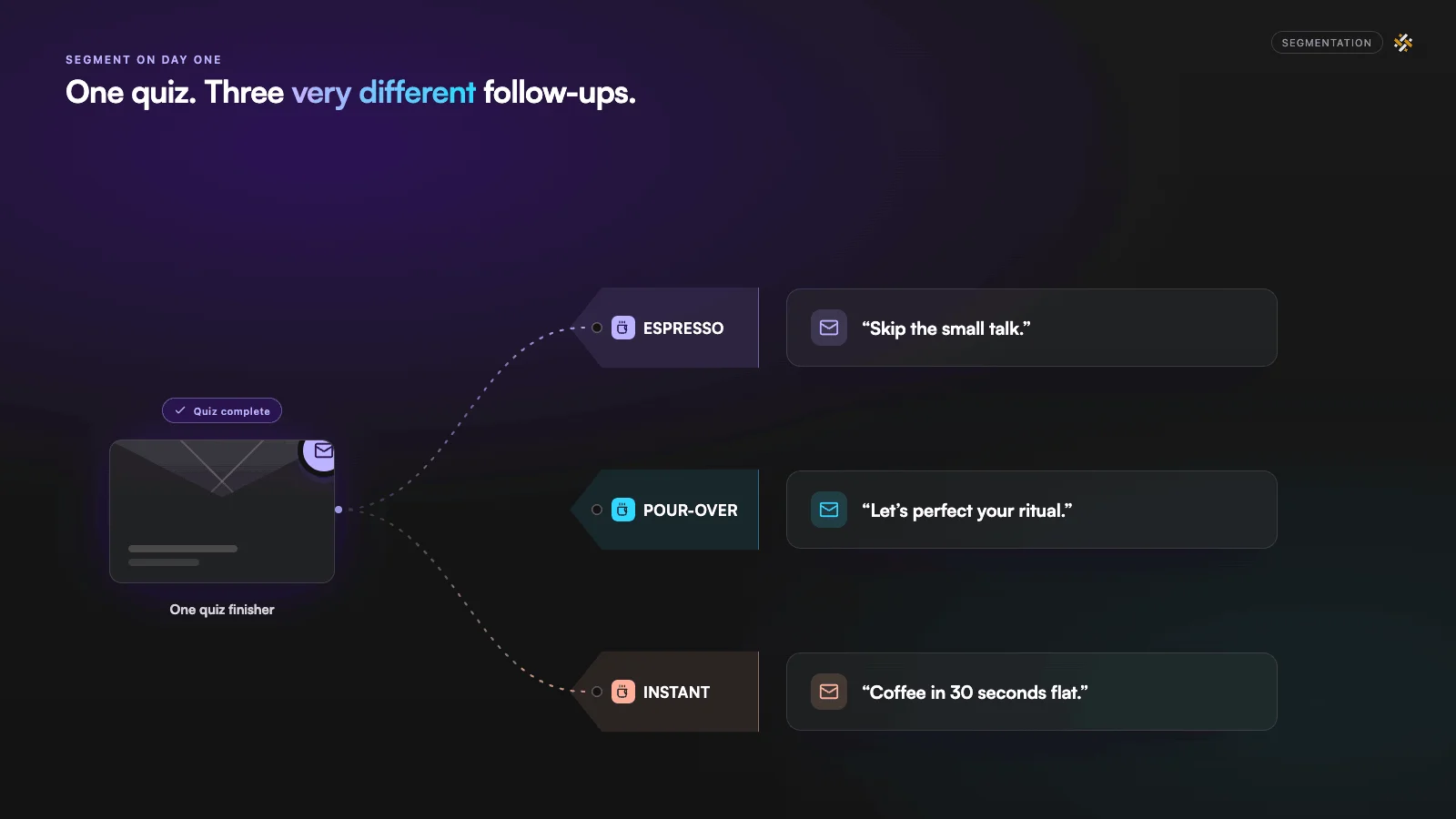
Here's the part most people miss. When someone finishes your quiz, you don't just get an email. You get an email with a label attached. "Espresso," "Pour-over," "Instant." That label is a segment, and segmenting your follow-up by it is where the money is.
The difference between a segmented list and one big list is large and well documented. The Direct Marketing Association's often-cited figure is a 760% increase in email revenue from segmented campaigns. Treat that as directional, but the direction is not in doubt. A more concrete example: when Kate Spade split its list by interest and then tailored the emails, Litmus reports a 50% lift in conversion rate, a 36% jump in click-through, and a 174% increase in revenue.
A personality quiz hands you that segmentation on day one, before anyone has bought anything. If you sell coffee gear and someone comes out as a "Pour-over purist," you already know which products to show them. If you're a coach and someone is a "Burnout-prone overachiever," your welcome sequence can speak to exactly that. You're not guessing what your subscribers care about. They told you, and they had fun doing it.
How do you design a personality quiz that actually works?
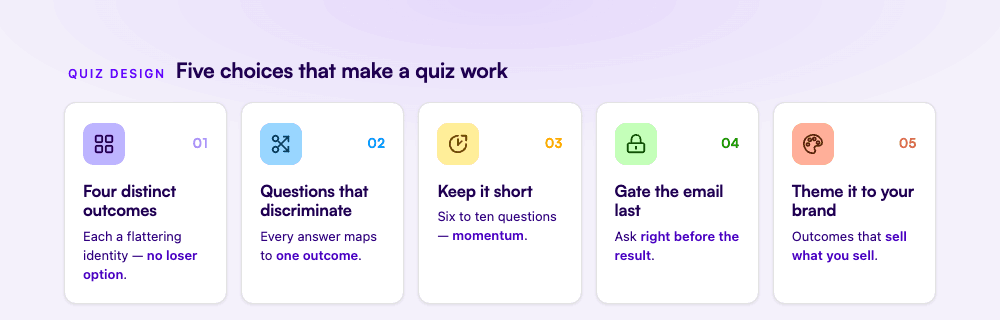
A good personality quiz comes down to five design choices: distinct outcomes, questions that actually discriminate between them, short length, the email gate placed right before the result, and a theme that fits your brand. Most weak quizzes fail on the second one: they're fun to answer but every question points everywhere, so the result feels random.
Choose four distinct personality types
Four is a good number, and each should feel like a small, flattering identity someone would be happy to claim ("The Cold Brew," "The Classic Drip"), not a ranking where one option is obviously the loser. Unlike a graded quiz, a personality quiz has no correct answers: every outcome is a win, which is part of why people are happy to share theirs. Distinct outcomes are also what make the result shareable and what make the segment useful later.
Create questions with distinct answer options
Every question should split people toward different outcomes: multiple choice, not open text. The test for a good question: each answer option should map cleanly to one outcome. "What's your ideal Saturday morning?" works because each answer pulls toward a different coffee type. "Do you like coffee?" doesn't discriminate at all. Drop it.
Keep it short
Six to ten questions is the sweet spot. Long quizzes lose people before the result, which is the moment that captures the email and triggers the share. Resist the urge to make it comprehensive; you're not building a psychometric instrument, you're building momentum toward the result.
Gate the email right before the result
This is the single most important placement decision. Ask for the email up front and you kill the start rate; ask after they've answered every question, when they're one tap from finding out their type, and most people hand it over without thinking. The investment they've already made does the persuading.
Theme it to your brand
The topic, the outcome names, and the images on each result page should all connect to what you sell or stand for. A coffee roaster's quiz should be about coffee personalities, not generic trivia. The closer the theme sits to your product, the more qualified the leads and the more relevant the segments.
Examples to steal
The quickest way to get the idea is a concrete one, so here's the example we use in our video tutorial: "What's your coffee personality?" It sorts people into one of four coffee types, asks a handful of fun, closed-ended questions, gates the email before the reveal, and gives each type its own shareable result page with share buttons. It's the whole pattern in one quiz: fun on the surface, a segmented lead-gen engine underneath.
The same shape works for almost any brand or creator. The framing is usually some version of "what type of [X] are you?":
- A SaaS or B2B brand: "What's your team's workflow style?" The result does your lead qualification up front, sorting people into personas your sales or onboarding can speak to directly.
- A coach or course creator: "What's your productivity archetype?" Each outcome maps to a different pain point and a different offer.
- An e-commerce or lifestyle brand: "What's your [skincare / travel / home] personality?" The result doubles as a product recommendation hook.
- A creator or newsletter: "Which [character / era / vibe] are you?" Pure engagement and shareability, building a list off the back of fun.
Notice these are all BuzzFeed-style in form but built for a business outcome. You're borrowing the format that made quizzes spread and pointing it at a list you own.
Can you make a personality quiz in Google Forms?
You can make a basic version in Google Forms, and for a lot of people it's a reasonable place to start: it's free, there are no response limits for most users, and you can build something that works. So if you've searched for how to make a personality quiz on Google Forms, the honest answer is yes, though you'll hit real limits fast.
The catch is how Forms handles scoring. Its quiz mode is built to grade answers against a right answer, so it can't assign weighted points across answers, build proper score ranges, or change the result page based on the outcome, which is exactly what a personality quiz needs. You can fake a simple version using the "Go to section based on answer" feature to branch people to different result sections. But for a real personality result based on cumulative answers across several questions, you end up routing responses into Google Sheets and calculating the winning type there by hand, and respondents won't automatically see a personalized result without extra tools. On top of that, there's no native way to require an email right before the result, the one placement that makes the quiz a lead magnet.
So Google Forms is fine for a quick branching quiz. It's the wrong tool the moment you want real outcome scoring, an automatic themed result page, and an email gate: the three things that turn a fun quiz into a list-builder. That's the gap the next section closes.
How to build one in minutes with Weavely
Weavely is an AI form and quiz builder: you describe the quiz you want in a prompt and it builds the questions, a result page for each outcome, and the scoring that sorts people into a type. No manual point-counting, no spreadsheet workaround, and the email gate before the result is built in. You can then refine anything by prompt or by hand.
Here's the exact prompt behind the coffee example, which you're welcome to adapt:
I want a fun personality quiz titled "What's your coffee personality?" that
sorts people into one of four coffee types. Write fun, closed-ended questions
that determine someone's type. Ask for their email before revealing the
result, and give each type its own result page.
Watch the full build in the video at the top of this post, and for the step-by-step mechanics see our help-desk guide on building a match quiz. A few things worth knowing. It's genuinely free to start, with unlimited forms and responses on the free tier, no payment details required, and a small "powered by Weavely" badge. It's no-code. And once the quiz exists you can share it as a direct link, embed it on your site as a form or pop-up, or drop it behind a QR code. Prefer to start from a template instead of a blank prompt? Our personality quiz maker has ready-made ones you can customize.
Collecting and using your quiz results
Every completed quiz lands in Weavely as an email plus the outcome that person got: the segment, attached automatically, with an email notification whenever someone new completes it. That's the asset. From there you can route those leads into your CRM with the outcome carried along, using integrations like HubSpot, Pipedrive, Airtable, or Google Sheets, so the "type" someone got becomes a tag your email tool can act on.
The point isn't the plumbing, it's what the plumbing lets you do: send the "Cold Brew" segment one welcome sequence and the "Pour-over" segment another.
Start with one question
The hardest part of a personality quiz isn't building it: that's a prompt and a few minutes. The hard part is the one decision up front: what are the four types your audience would be delighted to discover they are? Answer that, and the rest is fun for them and a segmented list for you.
Try Weavely free and turn your first idea into a quiz today.

Florian is the co-founder and CEO of Weavely, where he does a bit of everything: from product and fundraising to making YouTube videos and writing for the blog. He holds a PhD in computer science and sits on the board of No Code Belgium, the country's no-code community, after more than seven years as a researcher and business developer at Vrije Universiteit Brussel. He writes the hands-on tutorials here, drawing on both an academic background and the day-to-day reality of building a form tool from the ground up. Based in Brussels.


