How to Create a Patient Intake Form Online (Free for Every Practice Type)
Most practitioners already know they need a solid patient intake form. That's not the problem. The problem is the hour you'd spend building one in Google Forms, only to end up with something that doesn't quite ask the right questions for your practice type. Or the patient intake form template that's close enough on Jotform, except the fields you actually need are locked behind a paid plan. So "sort out intake form" stays on the to-do list for another week, and in the meantime you're emailing a PDF and hoping clients remember to send it back.
This article covers what to include in a new patient intake form depending on your practice, how digital compliance actually works for independent practitioners, and how to go from nothing to a live shareable form link in under a minute.
Do patients actually expect digital intake forms?
There's a common assumption that online patient intake forms are something bigger clinics do. Worth checking against some numbers.
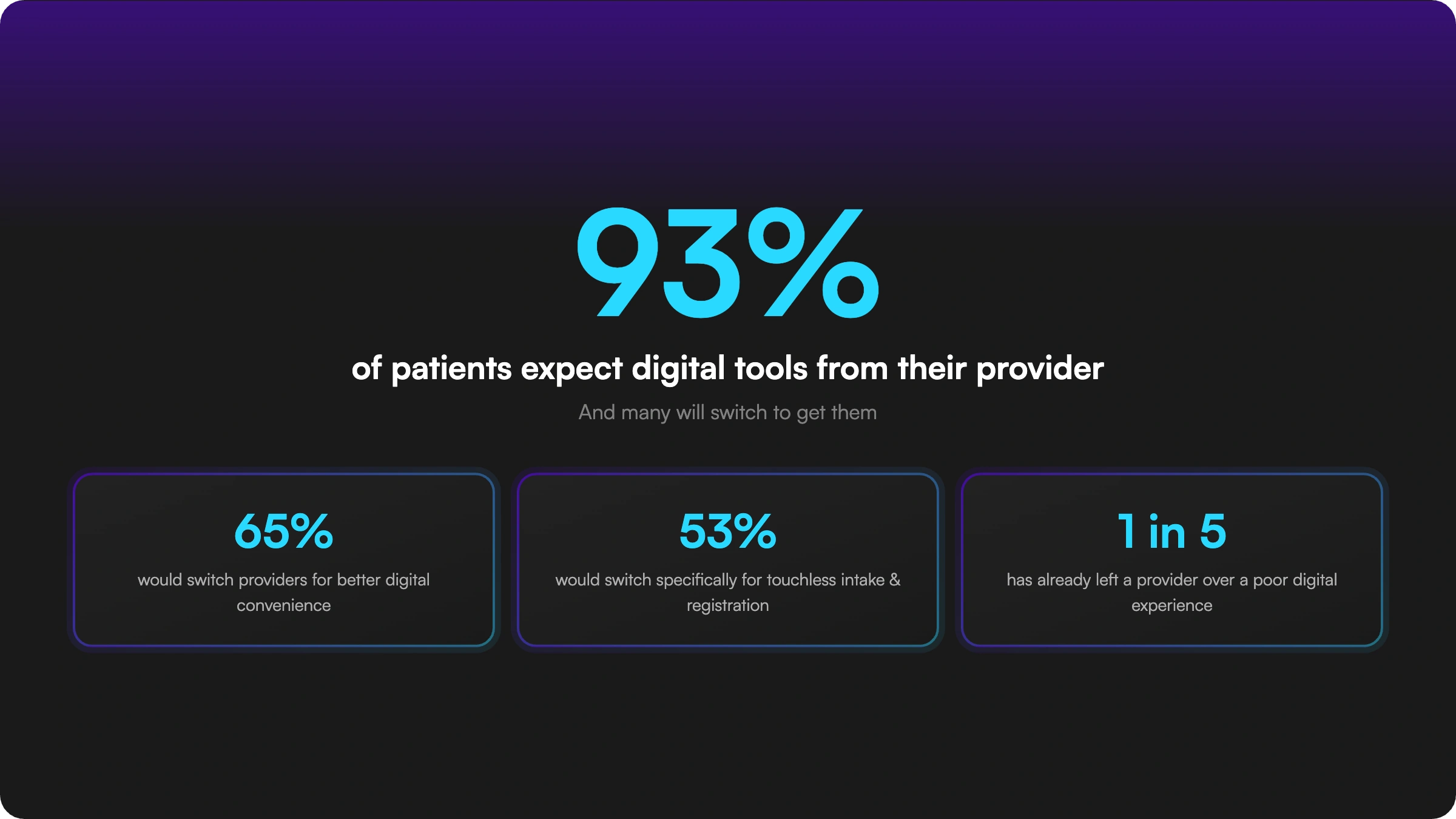
93% of patients now expect healthcare organisations to use digital tools when interacting with them. Not appreciate. Expect. And 65% say they'd switch providers to get the digital conveniences they prefer in 2025. That includes intake specifically: 53% of patients would switch to a provider offering touchless intake and registration.
Worth noting: 1 in 5 patients has already left a provider because of a poor digital experience. Not because the care was bad. Because the admin was frustrating.
For large health systems this is manageable. For a solo practitioner or small clinic, losing a handful of clients over a clunky intake process is a real cost. And first impressions happen before the first appointment. An emailed PDF or a clipboard in the waiting room sets a tone before you've said a word.
What to include on a patient intake form, by practice type
There's no one-size-fits-all patient intake form because practices genuinely need different things. A yoga studio asking about contraindications is doing something very different from a physical therapist assessing a sports injury. Here's a breakdown by the most common independent practice types.
General wellness and coaching
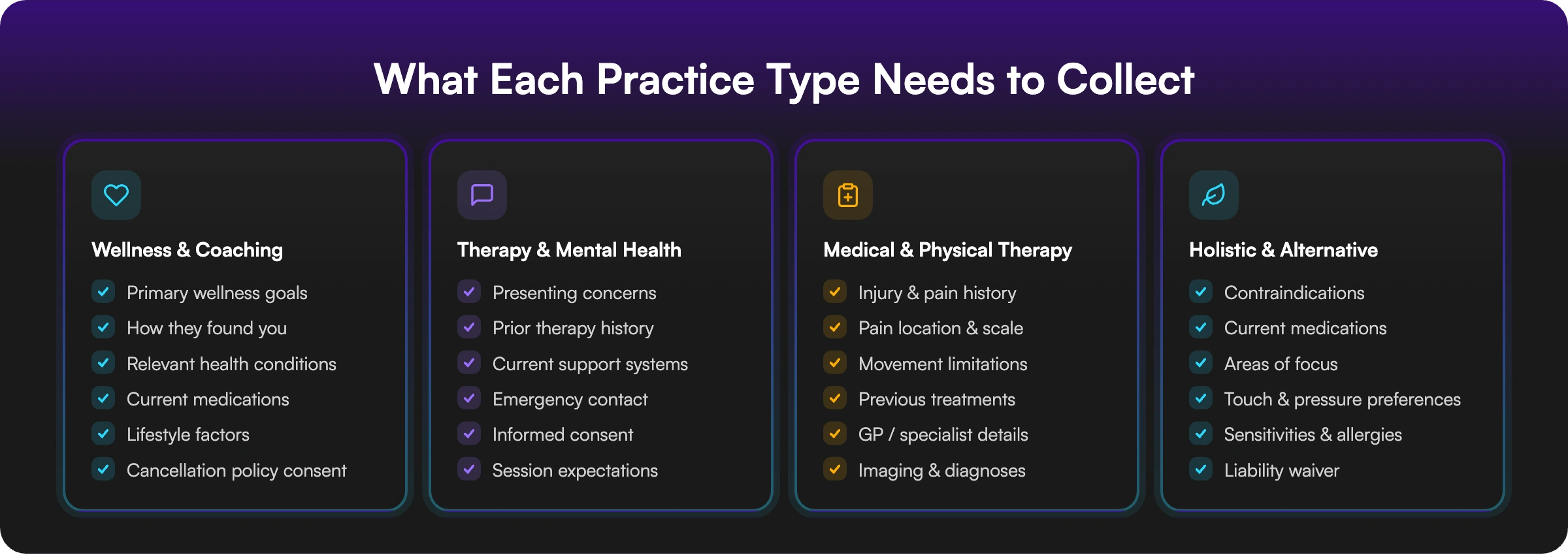
For life coaches, wellness coaches, nutritionists, and general wellbeing practitioners, the form can stay fairly light. Name, contact details, date of birth, how they found you, primary goals, any health conditions relevant to your work, current medications if applicable, and a sign-off on your cancellation policy. The main goal here is relationship setup rather than clinical documentation.
Therapy and mental health (private pay / non-billing)
For a therapy intake form, go a layer deeper. Cover presenting concerns, prior therapy history, current support systems, emergency contact, and informed consent. The form doubles as a first signal of how you work, so clarity about what your sessions involve is as useful as the information itself.
Medical and physical therapy intake
A medical intake form or PT new patient intake form tends to be the most detailed of the bunch. Injury history, pain location and scale, movement limitations, previous treatments, GP details, and any imaging or diagnoses the client brings. The more you capture upfront, the less of your session time goes to establishing baseline.
Holistic and alternative practices
Massage therapists, acupuncturists, reflexologists, and similar practitioners need forms covering health conditions, contraindications, current medications, areas of focus, and client preferences. Beyond being good practice, this is your liability baseline before any hands-on work.
The HIPAA question, answered clearly
HIPAA comes up constantly in conversations about digital health forms. Here's what a lot of guides skip over: HIPAA does not apply to everyone who collects health information.
HIPAA applies specifically to "covered entities": licensed healthcare providers who transmit health data electronically for insurance billing, plus health plans and healthcare clearinghouses. GPs, dentists, licensed therapists billing insurance. If you fall into that category, you need a HIPAA-compliant platform with a Business Associate Agreement.
But a large chunk of the independent wellness world falls outside those rules. Life coaches, wellness coaches, personal trainers, yoga instructors, cash-only nutritionists, massage therapists not billing insurance, and mental health coaches are not covered entities. A professional online patient intake form tool works fine for them.
One nuance to know: if you accept referrals from covered providers or bill through insurance, you could be classed as a "business associate" under HIPAA's 2014 updates, meaning the rules apply indirectly. If you're unsure, a quick call with a compliance advisor is worth it.
The practical version: no insurance billing, no clinical setting, a secure online form tool is the right fit. Treat client data sensibly regardless, a basic privacy policy and decent data hygiene are good practice for anyone.
How to create a patient intake form online
Most guides at this point say "find a patient intake form template and customise it." The catch is that generic templates don't know your practice. A massage therapist's form looks nothing like a life coach's. Starting from the wrong template means either asking clients for information you don't need, or missing fields that genuinely matter for your work.
A better approach is to describe your practice and let the form build around it.
That's how weavely works. You tell it what kind of practice you run and what you need to collect. Within seconds, you have a complete online patient intake form with the right fields, a logical flow, and a layout that works on any device. Then you refine it in plain language: "Add an emergency contact field," "Remove the insurance section," "Split it into two steps." It updates as you go.
When it's ready, you get a shareable link to send to clients, embed on your website, or drop into booking confirmations. Responses go straight to your Weavely dashboard. If you want a simple log, the Google Sheets integration sends every submission to a spreadsheet automatically.
Free, with no limits on forms or responses.
Getting clients to fill it out before they arrive
The real win with a digital patient intake form is the before-visit completion rate. Here's how to make that the default rather than the exception.
In your booking confirmation. Include the form link in whatever you send to confirm appointments. One line is enough: "Before your first session, please take 5 minutes to fill in our new patient intake form: [link]." Most people do it within the hour.
The day-before reminder. A quick message with the link the day before catches anyone who missed the first one. Practices that require intake completion before scheduling see no-show rates drop from around 25% to under 10%.
Your website. Link to the form from your new clients or book now page. Clients researching you before they book can start the intake process before they've even confirmed an appointment.
A QR code in your waiting area. For clients who show up without completing it, a printed QR code gets them filling it out on their phone in a minute. No paper, no manual entry afterwards.
Frequently Asked Questions
What information should a patient intake form include?
At minimum: name, contact details, date of birth, reason for the visit, relevant health history, current medications, and emergency contact. The specifics vary by practice type. A therapy intake form needs consent fields and prior mental health history. A medical intake form needs current symptoms and GP details. A life coach's form needs goal-setting questions. The benchmark is: can you walk into the first session already prepared, without asking questions the form should have answered?
Is a free online patient intake form good enough for my practice?
For most wellness practitioners, coaches, and independent therapists, yes. Free tools like Weavely give you professional, mobile-responsive patient registration forms with shareable links and automatic response collection. Where free tools fall short is for licensed clinical practices handling protected health information, which require a HIPAA-compliant platform and a Business Associate Agreement. Whether that applies to you depends on whether you bill insurance.
How do I send an online patient intake form to new patients?
Include the link in your booking confirmation email — that alone covers most cases. You can back it up with a day-before reminder, link it from your website's new client page, or put a QR code in your waiting area. Patients who complete intake before arriving tend to engage better in their first session, and you start on time.
What is the difference between a patient intake form and a patient registration form?
Often used interchangeably, but there's a distinction. A patient registration form typically covers contact details, insurance, and admin data. A patient intake form goes wider, including health history, presenting concerns, lifestyle factors, and reason for visit. Most new patient intake forms combine both in practice, and the label matters less than whether you're capturing what you need before the appointment.
Build your free patient intake form in 60 seconds
If your current intake process involves emailing PDFs, chasing responses, or asking clients to arrive 15 minutes early to fill out paperwork, there's a faster way.
Build your free online patient intake form with Weavely. Describe your practice, get your form, share the link. No templates, no setup, no cost.
Your next new client can fill it out at home, on their phone, before they ever set foot in your practice.


