How to Build a Lead Generation Quiz (With Examples That Convert)
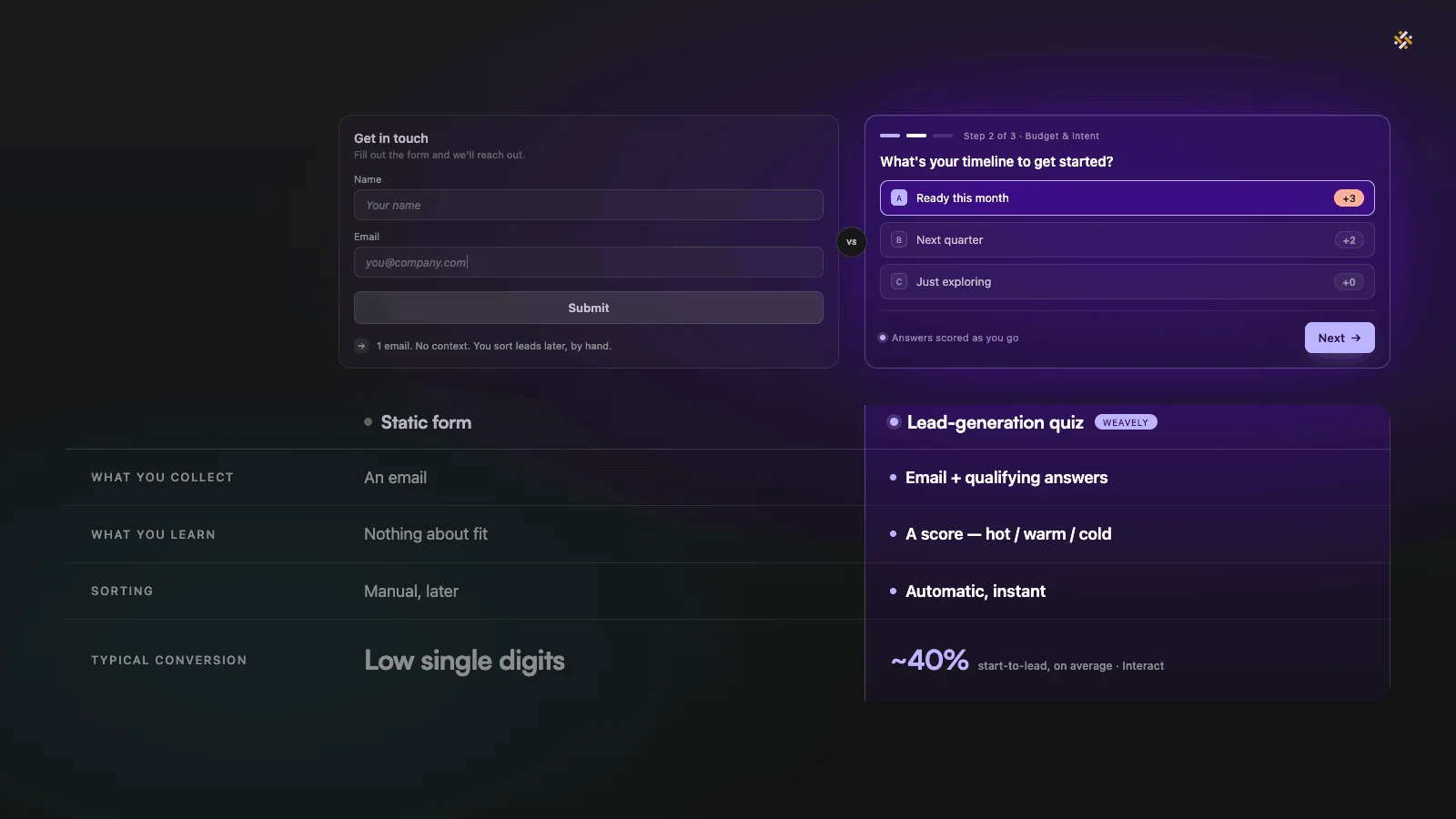
A lead generation quiz is an interactive, scored questionnaire that qualifies a prospect and captures their email in a single step. Where a static form just collects a name and waits, a quiz asks a few targeted questions, scores each answer, and sorts every respondent into a hot, warm, or cold lead, so your sales team knows exactly who to call first.
That difference shows up in the numbers. According to Interact's Quiz Conversion Rate Report, built on more than 80 million leads, 40.1% of people who start a quiz go on to become a lead. For service businesses (the category that includes marketing agencies, consultants, and web designers), that figure climbs to 42.2%. Most static lead forms convert in the low single to low double digits by comparison.
This lead gen quiz guide is for B2B marketers, agencies, consultants, coaches, and service businesses that need to qualify leads before a sales conversation. We'll cover what a lead generation quiz is, why it works, how the scoring logic turns answers into qualified leads, four examples you can copy, how to design one well, and how to route the results straight into your CRM.
What is a lead generation quiz, and how is it different from a lead form or lead magnet?
A lead generation quiz is a short, interactive assessment that gives the respondent a personalized result in exchange for their answers and their email. Unlike a static lead form, it does two jobs at once: it captures the contact and qualifies them, because the answers collect valuable data about each person's budget, intent, and fit. Frame the questions around what your target audience actually cares about, and that data practically gathers itself.
A traditional lead magnet (a PDF guide, a checklist, a gated webinar) is a one-way exchange. Someone hands over an email and gets a download; you learn nothing about whether they're a real buyer. A lead form is even thinner: a name, an email, maybe a company. You're left guessing.
A quiz flips that. Every answer is a data point, which turns lead generation into genuine data collection rather than a name grab. By the time someone reaches the email field, you already know their company size, their budget range, and how ready they are to buy. That is valuable data, and it hands you real insight into each lead. It's also why quizzes are such a strong source of zero-party data, information Forrester defines as data a customer intentionally and proactively shares. As third-party tracking keeps getting harder, the valuable insights people choose to give you are worth far more than anything you scrape.
One honest note before we go further: a quiz isn't always the right tool. If you just need a newsletter signup, or you're capturing a demo request from someone who already knows they want to buy, a plain form is faster and fine. A quiz earns its place when qualification matters, when you'd otherwise waste sales time on people who were never a fit.
Why lead generation quizzes work better than a static form
Lead generation quizzes work better than static forms because they trade value before they ask for anything. The respondent invests a little effort answering questions about a problem they actually care about, gets a personalized result, and only then sees the email field, by which point they're committed. It's an interactive way to turn passive website visitors into engaged prospects, and the data backs it up across every credible benchmark.
Interact's report puts the all-industry start-to-lead rate at 40.1%, with 65% of people who start a quiz finishing it. Static forms typically convert in the low single digits, so the gap is wide. A separate analysis of more than 14,000 landing pages by Kapost and CXL Institute found interactive content drove roughly 2.4 times more conversions than static alternatives. The DemandGen Report has put interactive content's conversion rate at around 70%, versus about 36% for passive content. The exact figures vary by source and should be read as directional, but the direction is consistent: interactive beats static, often by a wide margin.
There's a second payoff that doesn't show up in a conversion-rate column: lead quality. A static form generates leads you then have to sort. A quiz sorts them as they arrive. You don't just get more leads; you get qualified, high-quality leads, ranked, with the context your sales team needs to prioritize. More of your potential leads turn into real ones, and your team knows which to work first.
Why interactive quizzes hold attention
Interactive quizzes engage visitors in a way a static page can't, because they tap a simple curiosity gap: people want to know the answer about themselves or their business. A question like "Is your business ready for paid ads?" is hard to leave unanswered. That pull is why quiz takers stay engaged through several questions where they'd have abandoned a long form, and it's how interactive quizzes keep site visitors moving instead of bouncing, with each answer becoming a usable signal rather than a field someone skipped.
How quiz scoring turns answers into qualified leads
A quiz scoring system works by assigning point values to each quiz answer, adding them into a total, and mapping that total to an outcome band, typically cold, warm, and hot. Most quizzes use simple multiple choice questions, where each option carries a different weight based on the user's answers. The questions are chosen so that higher scores correlate with better-fit, more ready-to-buy leads, which means this quiz type qualifies people automatically the moment they finish.
Here's the logic in practice. Say you ask four questions, each with answers worth 1 to 4 points. The maximum score is 16. You then set brackets:
- 4–7 points → cold. Early-stage, low budget, or no urgency. Worth nurturing, not calling.
- 8–12 points → warm. Real interest and some budget, but not ready today.
- 13–16 points → hot. Strong fit, clear budget, ready to move. Call these first.
The questions doing the scoring should map to your actual qualification criteria: budget, company size, timeline, and decision-making authority are common ones. Softer questions ("what's your biggest challenge?") can stay in the quiz for engagement and segmentation without carrying much score. You can also use conditional logic to branch the quiz, showing different follow-up questions or results pages depending on earlier answers. The point is that the quiz isn't measuring trivia; it's measuring fit, and the score is your shortcut to surfacing high-quality leads.
Lead generation quiz examples
The fastest way to understand a lead generation quiz is to see a few. Below are four lead generation quiz examples across different business types, each with the questions that drive the score and the outcome bands they feed. They show how one engine can segment audiences as different as agencies and solar installers. Use them as templates: swap in your own criteria and scoring.
Example 1: A paid-ads-readiness quiz for a marketing agency
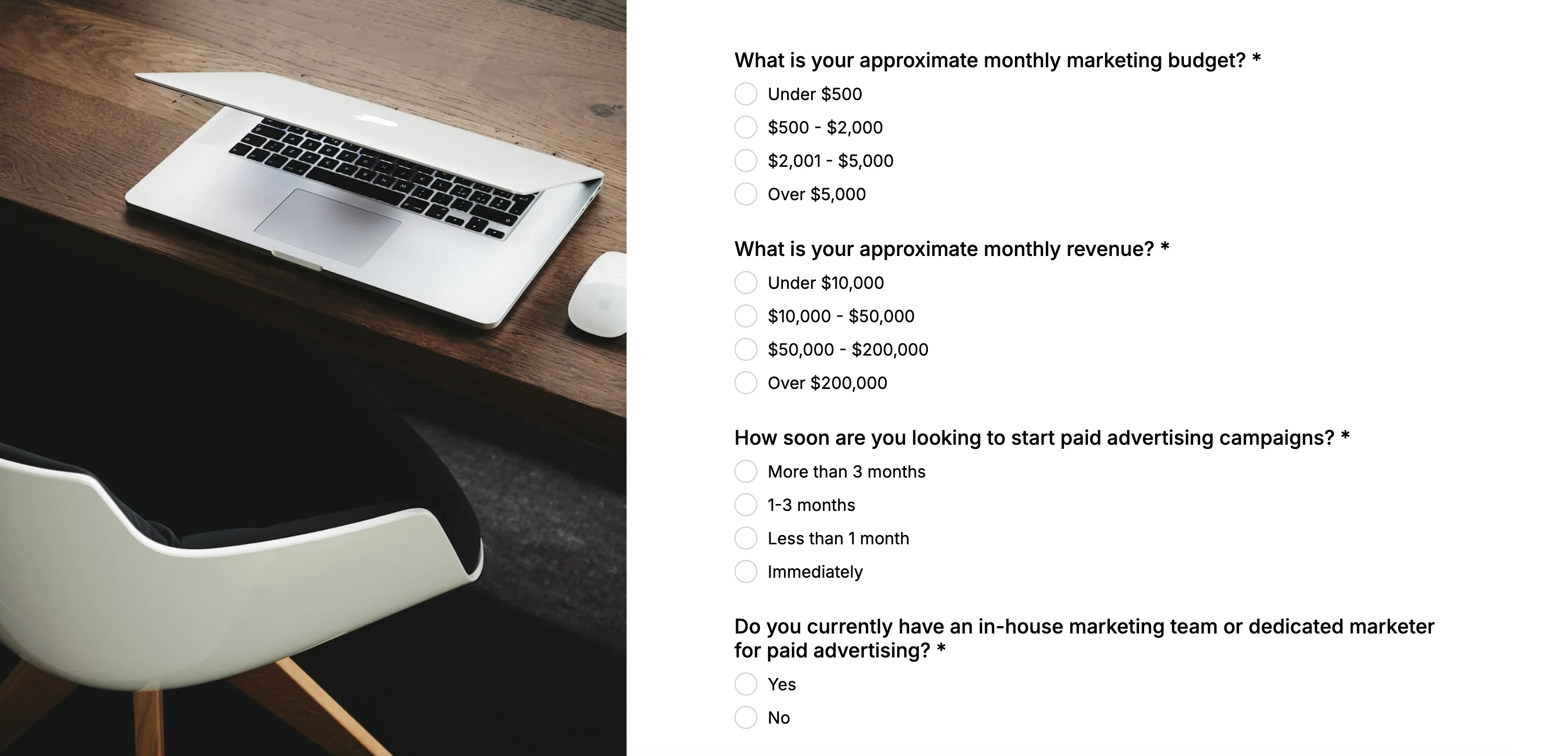
This is a great example, and the one from the walkthrough video below; it fits the service-provider category that converts at 42.2% start-to-lead. The goal of this lead quiz: figure out whether a business is ready to start paid advertising, so the agency only books calls with the ones who are. The quiz results then route each respondent to the right next step.
- Monthly marketing budget? (under $1k = 1 · $1k–5k = 2 · $5k–15k = 3 · $15k+ = 4)
- Current monthly revenue? (under $10k = 1 · $10k–50k = 2 · $50k–150k = 3 · $150k+ = 4)
- How soon do you want to start? (just researching = 1 · next quarter = 2 · this month = 3 · immediately = 4)
- Do you have an in-house marketer? (no one = 1 · a freelancer = 2 · one person = 3 · a full team = 4)
- Email capture to deliver the result.
Outcomes: Cold leads get a free "is paid advertising right for you?" guide; warm leads get case studies and a nurture sequence; hot leads land on a "book a strategy call" page.
Example 2: An engagement-fit quiz for a consultant
A consultant or coach uses a quiz to route prospects to the right offer instead of pitching everyone the same package. Questions probe stage and budget so the result recommends a fitting engagement.
- Team size? (solo · 2–10 · 11–50 · 50+)
- Biggest bottleneck right now? (strategy · execution · hiring · scaling)
- Budget set aside for outside help? (none yet · under $2k/mo · $2k–10k/mo · $10k+/mo)
- How soon do you want support? (someday · this quarter · this month · now)
Outcomes: low scores see a free resource or self-serve guide; mid scores are offered a group program or workshop; high scores get a 1:1 engagement booking link.
Example 3: A product-fit check for B2B SaaS
A "is this tool right for you?" quiz qualifies trial traffic before sales ever reaches out, and it doubles as honest positioning. Buyers respect a tool that tells them when it isn't a fit.
- Company size? (1–10 · 11–50 · 51–200 · 200+)
- Primary use case? mapped to your strongest, weakest, and adjacent use cases.
- Must-have integration? score higher for the ones you support natively.
- Evaluation timeline? (browsing · this quarter · this month · actively choosing now)
Outcomes: not a fit → helpful resources and an honest "we may not be right for you"; partial fit → docs and a self-serve trial; strong fit → a tailored demo booking.
Example 4: A solar qualification quiz for home services
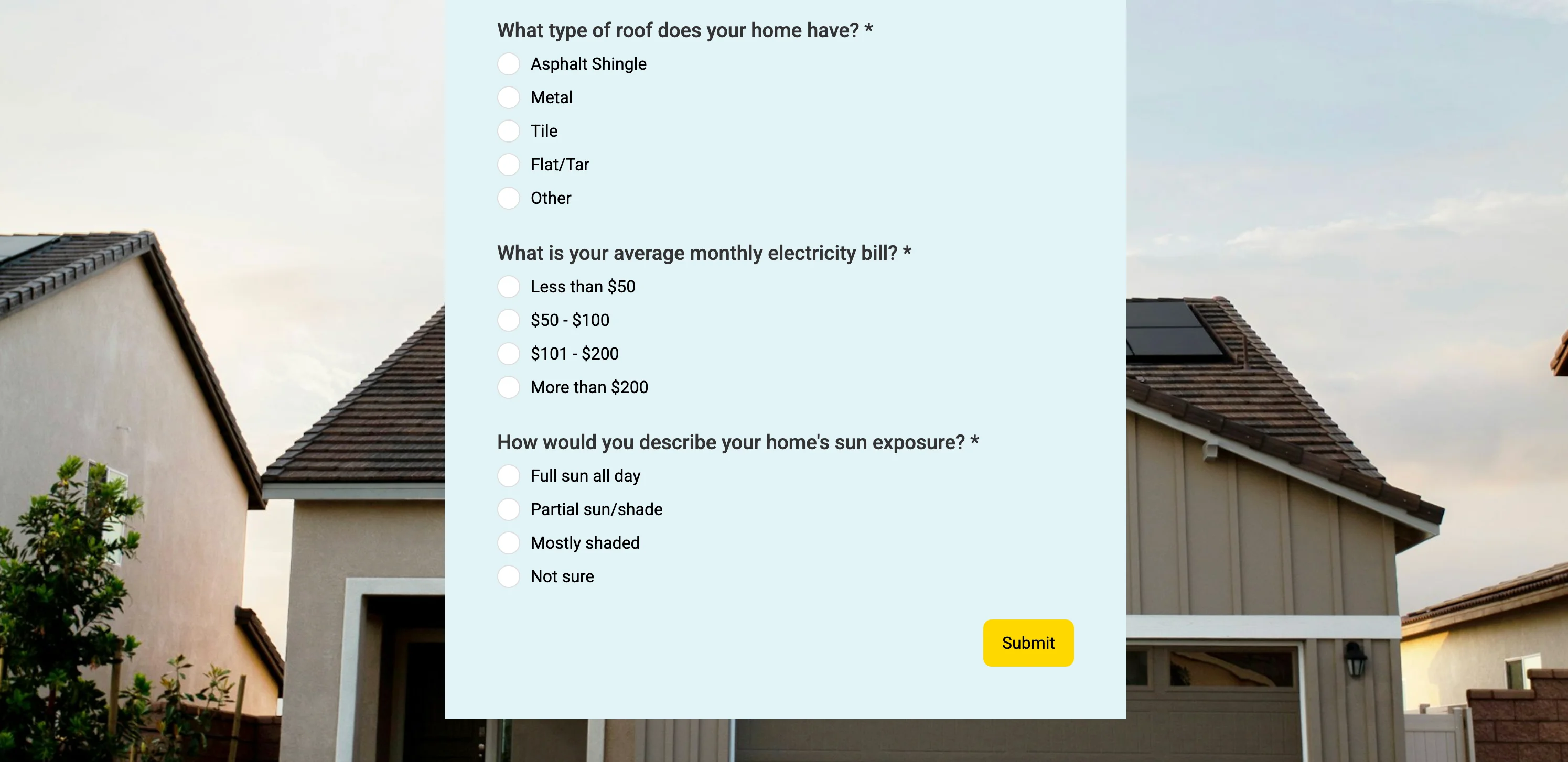
Field-service businesses (solar, roofing, HVAC) waste money sending crews to unqualified addresses. A quiz pre-qualifies on the factors that actually predict a sale.
- Do you own your home? (rent = disqualify or nurture · own = score)
- Average monthly electric bill? (under $80 · $80–150 · $150–300 · $300+)
- Roof age and condition? (needs replacing · over 15 years · 5–15 years · newer)
- Roof sun exposure? (mostly shaded · partial sun · mostly sunny · full sun)
- Timeline? (curious · within a year · within 3 months · ready now)
Outcomes: not yet → an educational "is solar worth it?" explainer; maybe → a rough savings estimate; strong candidate → a free on-site assessment booking.
How to design a high-converting lead generation quiz
High converting quizzes share a few traits: they're short, they ask questions the respondent finds relevant, and they only request the email once the quiz has delivered value. Design for completion first and qualification second; a perfectly scored quiz that no one finishes captures nothing. A few rules that consistently work:
- Keep it to five to seven questions. Enough to qualify, short enough to finish. Every extra question costs completions.
- Score for fit, not vanity. Tie point values to budget, timeline, size, and authority, the things that predict a sale.
- Use targeted questions the reader already cares about. "What's your biggest challenge?" earns engagement; a leading title earns the click.
- Give each segment different results pages and CTAs. Hot leads get a booking link; cold leads get a resource. Routing the outcome is where a quiz beats a form.
- Embed it where intent is highest (a relevant blog post, a service page, or a dedicated landing page), and share the link on social and in email.
Where to place the lead capture
Place the lead capture step after the questions and before the result, so the respondent has invested effort and is motivated to see their outcome. Putting the lead capture up front kills completion; burying it after the result means people leave with their answer and never hand over their contact details. Keep that lead capture light: an email, maybe a name, the basic contact information you need and nothing more. The pre-result spot is the sweet spot for lead capture.
One design tip worth calling out: you don't have to tell a lead they scored "cold" to their face. You can keep the scoring fully internal, still sorting people behind the scenes, while showing everyone the same neutral thank-you screen. That keeps the experience warm for the respondent while your CRM still gets the segment.
How to create a lead generation quiz in minutes with AI
You can create a working lead generation quiz in a few minutes with an AI quiz maker, with no code and no designer. A good AI quiz builder lets you build interactive quizzes from a single prompt: in Weavely, you describe the quiz you want and the quiz builder generates the questions, the scoring system, and the results pages in seconds. You then refine it by prompting again or editing by hand. The same approach lets you create quizzes for any use case, not just lead generation.
Here's the exact prompt used to build the marketing-agency quiz in the video at the top of this blog:
text
I want a lead qualification quiz for my marketing agency that scores how
ready a business is to start paid advertising. Ask about their monthly
marketing budget, current revenue, how soon they want to start, and whether
they have an in-house marketer. Capture their email. Sort respondents into
hot, warm, and cold leads, each with a different ending and call to action.
From there you can change the theme, add or reword questions, or adjust the score brackets, all by prompt or manually. When you're happy, publish to get a shareable link, a website embed code, or a QR code for social and print, the start of a simple quiz funnel that takes someone from a social post to a scored, qualified lead.
For the full step-by-step, see our help-desk guide. Worth knowing: as a free quiz maker, Weavely's free plan includes unlimited quizzes and responses (with a small "made with Weavely" badge), so the free plan lets you build and publish without paid plans getting in the way.
How to send quiz leads to your CRM
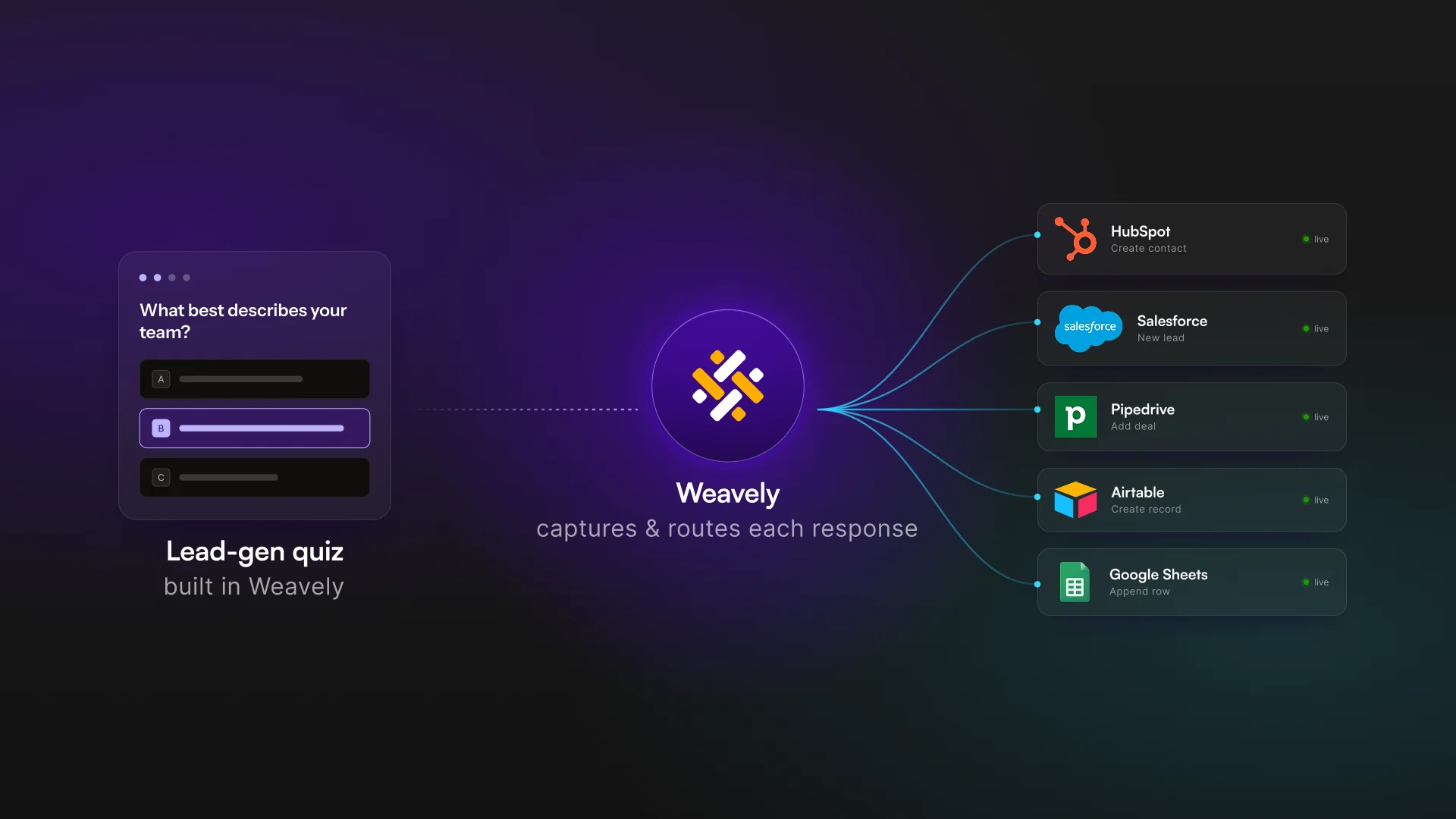
A lead generation quiz is only as useful as where the data goes next. Weavely sends each response, including the total score and the assigned outcome, straight into your CRM and email marketing platforms, so a hot lead can trigger an immediate sales task while a cold one drops into a nurture sequence automatically. Integrations include HubSpot, Salesforce, Pipedrive, Airtable, Google Sheets, and ActiveCampaign, so the quiz plugs into the marketing tools you already run.
This is the step most teams skip, and it's where the speed-to-lead advantage is won or lost. If your quiz score lands in a CRM field, you can route new leads, prioritize them by score, and follow up while intent is still hot, instead of exporting a spreadsheet and getting to it on Friday. Map the score and outcome to custom fields ("Lead Score," "Segment") and let your automations do the sorting.
For more on capturing leads with forms generally, see our pillar guide on lead-generation forms.
Lead generation quiz FAQ
How do lead generation quizzes generate leads? They give a personalized result in exchange for answers and an email. The respondent invests effort answering questions, and the email is requested right before the result is revealed, so people are motivated to complete the exchange rather than abandon a cold form.
What's a good conversion rate for a lead generation quiz? Interact's data puts the average start-to-lead rate at 40.1% across industries, rising to 42.2% for service businesses, with about 65% of starters finishing. Anything in that range is healthy; low conversion usually means the topic isn't relevant enough to the audience.
How many questions should a lead gen quiz have? Five to seven is the sweet spot, enough to qualify a lead and short enough that people finish. Each additional question reduces completion, so cut anything that doesn't earn engagement or contribute to the score.
Are there lead generation quiz templates? Yes. The four lead generation quiz examples above (agency, consultant, B2B SaaS, home services) work as starting templates. You'll also find free quiz templates in most builders, or you can describe your use case in a prompt with an AI quiz maker and generate a tailored quiz, then adjust the questions and scoring.
What's the best lead generation quiz maker? The best lead generation quiz maker depends on your stack and how much you value speed. A strong quiz maker has built-in lead scoring, per-segment outcomes, and native CRM integrations. Weavely covers all three and, as an AI quiz maker, builds the quiz from a prompt, but the honest test is whether a quiz maker routes a scored lead into your CRM without extra work.
Build your lead generation quiz free
A lead generation quiz turns a passive form into a qualifying machine: more leads, ranked by fit, with the context your team needs to act. You can build your own lead generation quiz with AI in minutes and publish it on Weavely's free plan, with unlimited quizzes and responses included.

Florian is the co-founder and CEO of Weavely, where he does a bit of everything: from product and fundraising to making YouTube videos and writing for the blog. He holds a PhD in computer science and sits on the board of No Code Belgium, the country's no-code community, after more than seven years as a researcher and business developer at Vrije Universiteit Brussel. He writes the hands-on tutorials here, drawing on both an academic background and the day-to-day reality of building a form tool from the ground up. Based in Brussels.


