Form Design: How to Create Branded Forms with AI
Ever sent out a form that looks like it was built in 2005? You know the one ... Times New Roman, default blue links, zero personality. Meanwhile, your website looks gorgeous, your emails are on-brand, and then… boom. A form that screams "I gave up."
Here's the thing: your forms are often the first real interaction someone has with your business. Contact forms, registration pages, surveys—they're not just data collection tools. They're brand touchpoints. And when they look generic or slapped together, you're basically telling people, "We didn't care enough to make this match our brand."
The good news? Creating professional, branded forms doesn't have to mean wrestling with CSS for three hours or hiring a designer. Thanks to AI form builders, you can now generate custom forms that automatically match your brand identity in seconds. Seriously, you just paste your website URL, and the AI handles the rest.
In this guide, I'll walk you through everything you need to know about form design: why branding matters, what makes a form look professional, and how modern AI tools (like Weavely) can turn "meh" forms into branded experiences that actually convert. Whether you're building contact forms, surveys, or registration pages, you'll know exactly how to make them look like they belong to your business.
Let's dive in.
What is Form Design and Why Does Branding Matter?
You know that feeling when you land on a gorgeous website, get excited about a product, click "Sign Up"... and then the form looks like it came from a completely different company? That disconnect is jarring.
Form design is everything that makes your forms look and feel like they belong to your brand: colors, fonts, button styles, spacing, and even the tone of your labels. It's the difference between "another boring form" and "wow, this company has their act together." Think about it: you wouldn't send a client a proposal in Comic Sans, right? So why send them a form that looks like a generic template?
The Role of Visual Identity in Digital Forms
Your visual identity (e.g. logo, color palette, typography) is how people recognize you instantly. Branded forms extend that same consistency to every touchpoint. When someone lands on your contact form or survey, they should immediately know it's yours.
Here's what happens when forms don't match your brand:
- Confusion: "Did I click the wrong link?"
- Distrust: "Is this legit?"
- Disconnect: "This company seems unprofessional"
A well-designed form that matches your brand builds trust and removes friction. Simple as that.
How Brand Consistency Impacts Form Conversion Rates
Here's where it gets interesting. Brand consistency isn't just about aesthetics. It directly impacts completion and conversion rates!
According to a Lucidpress study conducted with Demand Metric, consistent branding can increase revenue by 23-33%. Why? Because consistency helps customers recognize and remember your brand, making it easier for them to choose you over competitors.
The psychology is simple:
- Familiar = Safe → Users trust brands they recognize
- Professional = Credible → Polished forms signal you care about details
- Seamless = Easy → Consistent design lowers cognitive load
Real-world example: Flying Scot, an airport parking provider, saw a 35% increase in form submissions and a 45% boost in overall conversion rate simply by simplifying and improving their booking form design to better match their brand VWO.
Same fields, same questions... just better form design that felt cohesive with their brand.
Common Form Design Mistakes That Hurt Your Brand
Let's talk about what not to do:
Using default templates – Times New Roman and blue hyperlinks scream "built in 2008." Your brand deserves better.
Clashing colors and fonts – Navy and gold website, but bright red form buttons? Visual whiplash kills credibility.
No brand elements – Zero logo or brand colors means users won't associate the form with you.
Mobile disasters – If your form is unreadable on phones, you're losing conversions. Most traffic is mobile now.
Inconsistent tone – Friendly website copy but your form says "ENTER DATA HERE" in all caps? Tone is branding too.
Okay, so branding matters. But you're probably thinking, "Sure, but doesn't this take forever to set up?" Fair question. Here's a 90-second demo showing exactly how fast AI can turn your website into a fully branded form:
Pretty wild, right? Now let's break down what's actually happening under the hood...
Essential Elements of Professional Form Design
Now that you know why branding matters, let's talk about the how. What actually makes a form look professional and on-brand?
Typography and Font Selection for Brand Recognition
Fonts are one of the first things people notice. The golden rule: Use the same fonts you use everywhere else. If your website uses Montserrat for headers and Open Sans for body text, your forms should too.
Common mistakes: mixing too many fonts (stick to 2-3 max) or using fonts that are hard to read on mobile.
Color Schemes: Applying Your Brand Colors to Forms
Your brand colors should show up strategically in your forms:
- Primary color → Buttons and key actions
- Secondary colors → Form fields and accents
- Contrast → Make sure text is actually readable
Your CTA button should stand out but still feel like your brand. Don't use random colors just because "they convert better."
Logo Placement and Brand Elements in Custom Forms
Your logo is a trust signal. Place it top-left or center where it's immediately visible. Other brand elements like icons, patterns, or photography styles should also align with your website. You want someone to look at your form and immediately think, "Yeah, that's from [your company]."
Form Layout Best Practices for User Experience
Professional forms aren't just pretty—they're functional:
- White space → Don't cram everything together
- Single column → Easier to scan and complete
- Mobile-first → Most people see forms on phones
- Clear labels → Tell people exactly what you need
Getting these elements right transforms your form design from forgettable to conversion-optimized.
How AI Form Builders Transform Brand Consistency
Here's the problem: most form builders like Google Forms or Jotform give you basic customization. Maybe a color picker and a logo upload. But matching your exact brand fonts, applying your specific color palette to every element, and getting the spacing just right? That usually means digging into custom CSS or spending an hour manually tweaking settings for each form. For most businesses, it's too technical or too time-consuming to get branded forms that actually match their website.
AI changes that completely.
What is an AI Form Generator?
An AI form generator is a tool that uses artificial intelligence to automatically create and style forms based on your existing brand. Instead of manually configuring every color, font, and design element, you simply point the AI at your website and it does the heavy lifting.
Think of it as having a designer who instantly understands your brand guidelines and applies them consistently across every form you create. The technology analyzes your website's visual elements (colors, typography, spacing, button styles) and generates forms that look like a natural extension of your brand. No CSS knowledge required. No manual configuration. Just instant brand consistency.
How AI Extracts Brand Identity from Your Website
So how does an AI form builder actually "learn" your brand? It's simpler than you might think.
When you provide your website URL, the AI:
- Analyzes your color palette → Extracts primary and secondary brand colors from your site
- Identifies typography → Detects which fonts you use for headers and body text
- Studies design patterns → Observes button styles, spacing, and visual hierarchy
- Captures brand elements → Recognizes your logo and visual style
Within seconds, it builds a complete understanding of your brand's visual identity. Then it applies those same design principles to your form. Automatically matching colors, fonts, button styles, and overall aesthetic.
Automated Form Customization: From URL to Branded Form
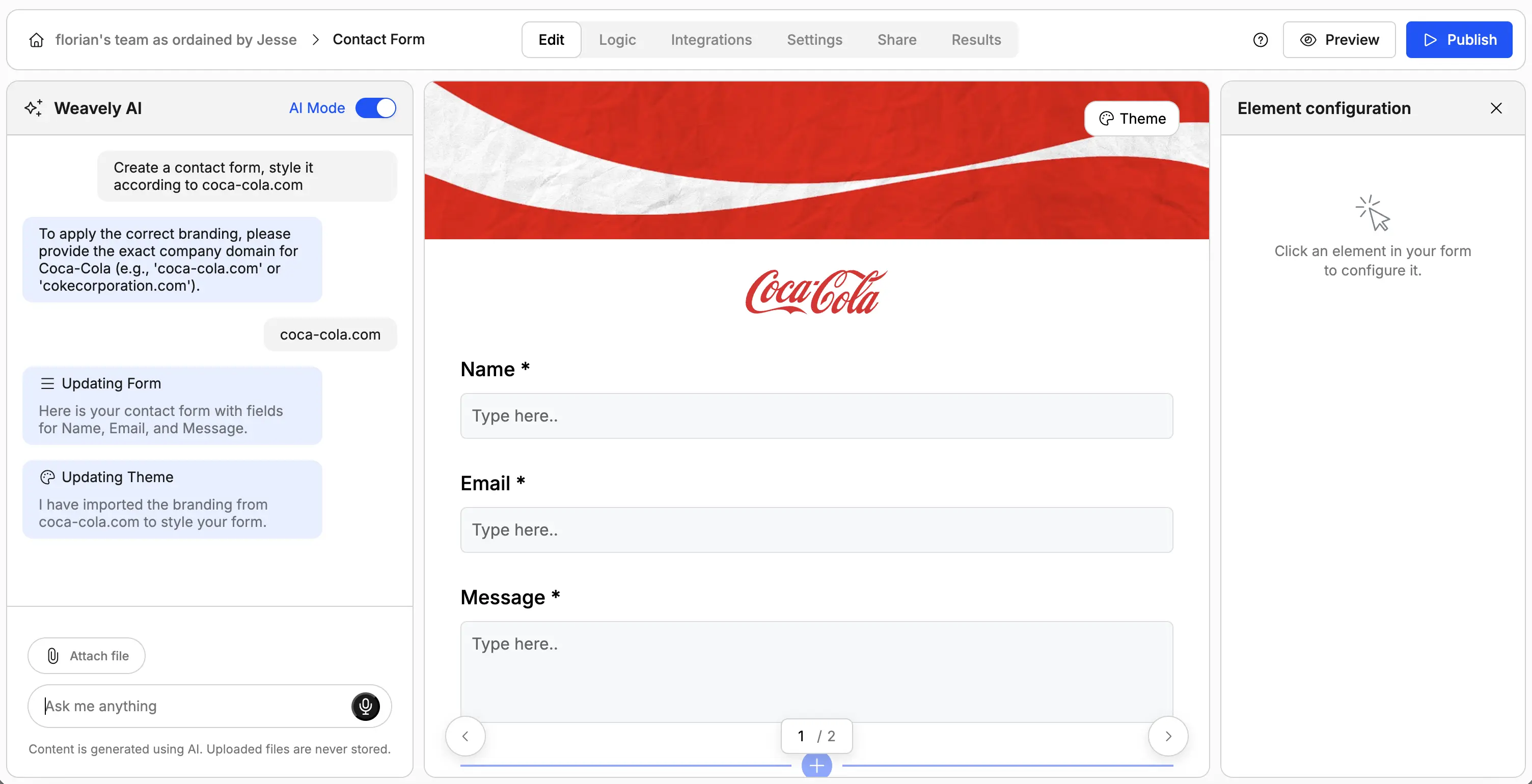
The actual process is remarkably fast. Here's what happens:
- You paste your website URL into the conversation box and ask Weavely AI to style the form accordingly.
- The AI scans your site and extracts your brand identity (colors, fonts, style).
- You describe what kind of form you need (contact form, survey, registration, etc.).
- The AI generates a fully styled, branded form that matches your website.
No manual tweaking. No CSS. No hour-long styling sessions. And if you want to make adjustments? You can still customize individual elements. But the heavy lifting, getting 90% of the way to a perfectly branded form, happens automatically.
This is form customization at scale. Create one form or a hundred, and they'll all maintain perfect brand consistency without you spending hours on each one.
Form Design Examples and Inspiration
The best way to understand professional form design is to see it in action. Here are real examples of how a tool such as Weavely AI can extract brand identity from well-known companies and apply it to forms instantly.
B2B Business Forms: Professional and Trust-Building
Microsoft Contact Form
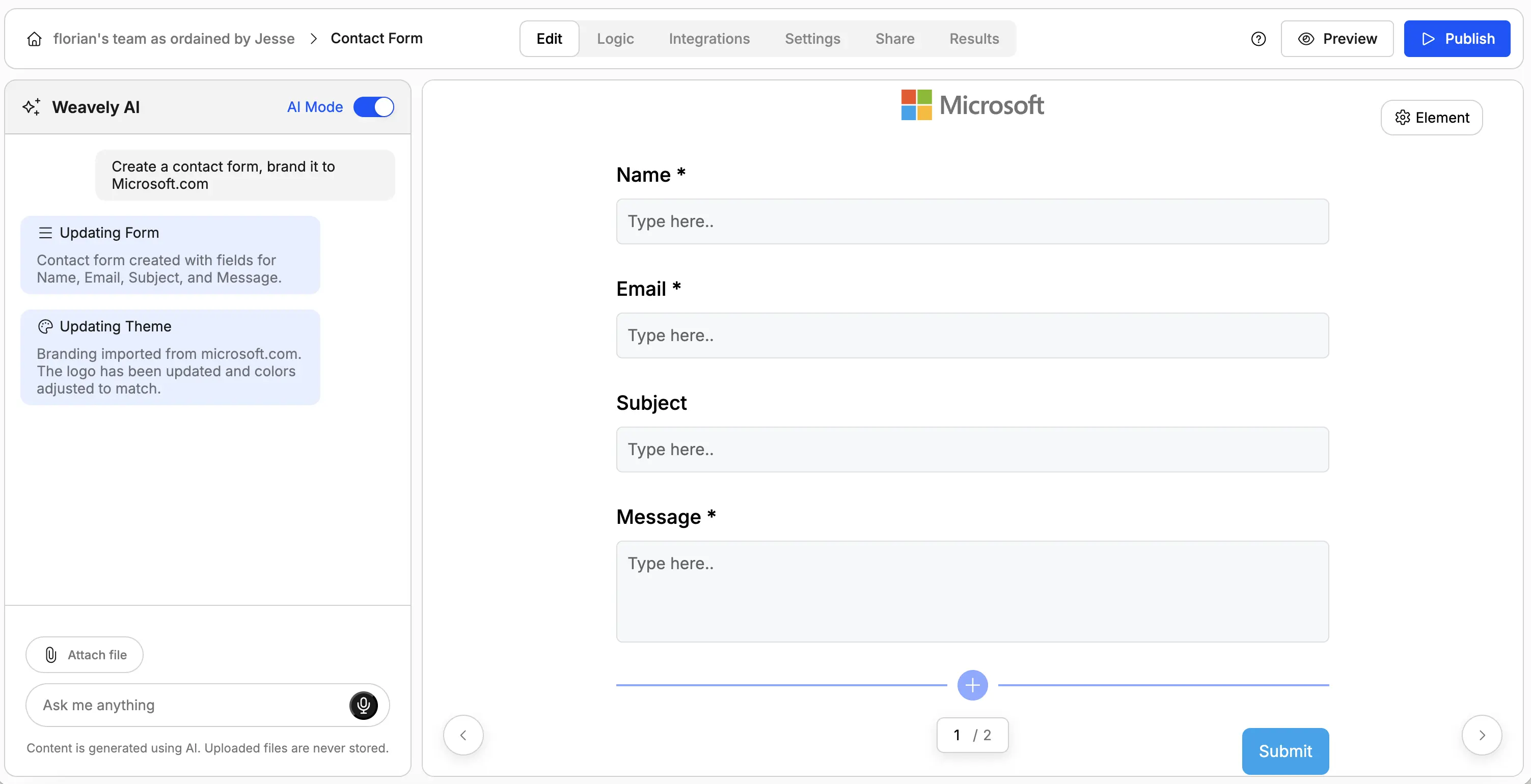
Sure, it's just a contact form. But simplicity is key here, the Microsoft logo automatically added to the top of the form and the light-blue teal-ish CTA color. Just the right amount of branding while staying "enterprise serious".
E-commerce Order Forms: Brand-Aligned Product Forms
Nike T-shirt Order Form
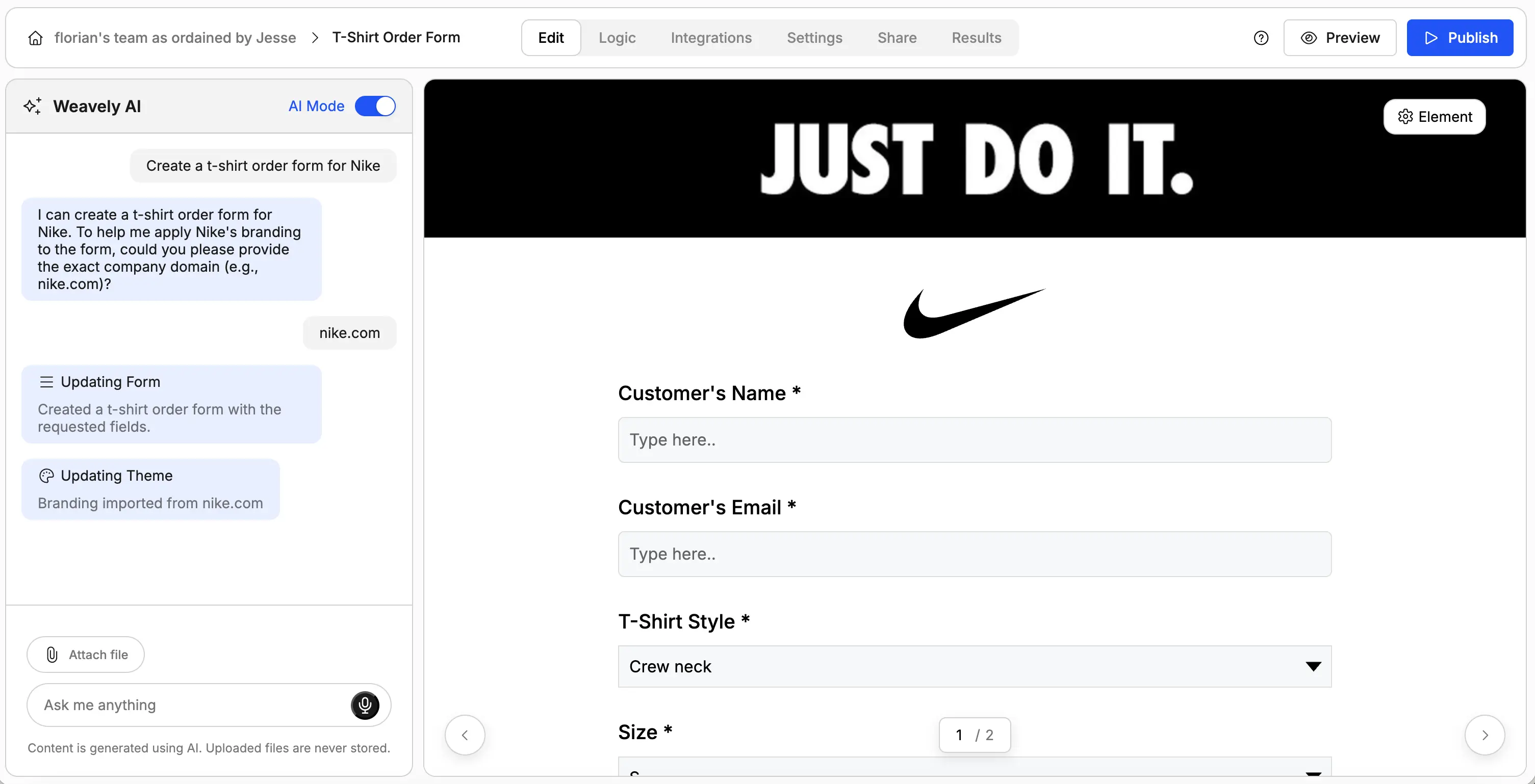
This example shows how branded forms work for e-commerce. In this case a t-shirt order form for Nike. Granted, they most likely would collect orders through their e-commerce store. But how cool is that "Just Do It" banner added to the top of the form by AI ?
Event Registration: Branded Survey Design in Practice
TEDx Event Registration Form
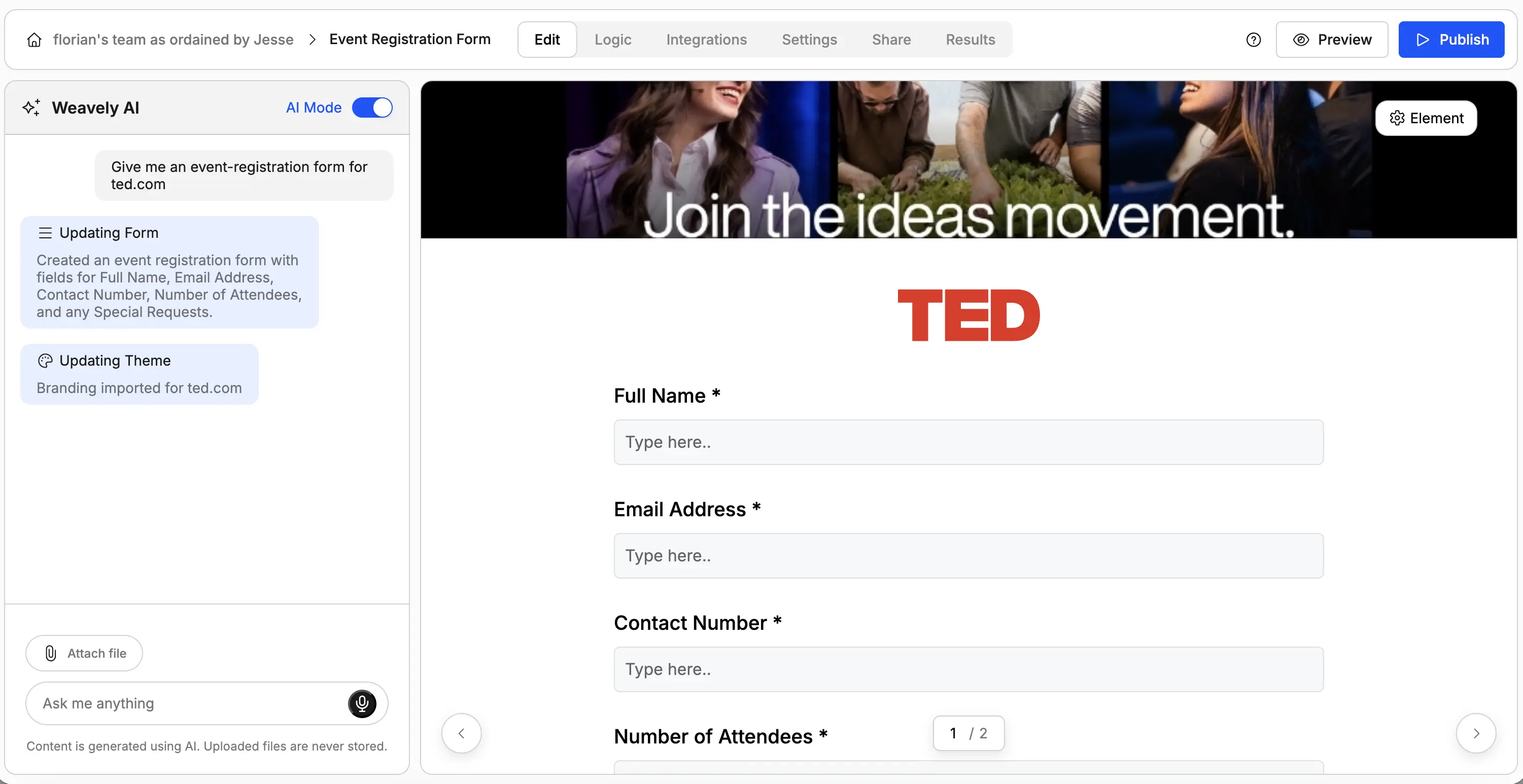
For events, branding creates excitement and legitimacy. This form captures Ted's main branding elements. This is survey design that feels like part of the event experience, not a generic registration page.
In each example, the AI transformed a simple URL into a fully branded form in seconds. Different industries, different styles, but perfect brand consistency across the board.
Conclusion: The Future of Form Customization with AI
Form design used to be a choice between fast or branded. You could throw up a generic Google Form in minutes, or spend hours manually styling something that actually matched your website. AI form builders eliminate that trade-off completely.
Now you can have both: branded forms that look professionally designed and maintain perfect brand consistency, generated in the time it takes to paste a URL. Whether you're creating contact forms, surveys, registration pages, or lead gen forms, the technology handles the heavy lifting while you focus on asking the right questions.
The brands that win are the ones that pay attention to every touchpoint. Including the ones that traditionally got ignored because they were "too technical" or "too time-consuming" to brand properly. With AI handling form customization, there's no excuse for off-brand forms anymore.
Frequently Asked Questions
What is an AI form builder?
An AI form builder is a tool that automatically creates and styles forms based on your brand identity. You provide your website URL, and the AI extracts your colors, fonts, and visual style to generate forms that match your brand in seconds.
How do I create branded forms for my business?
Creating branded forms with AI is simple: paste your website URL into an AI form builder, and it automatically extracts your brand colors, fonts, and design style. The AI generates a matching form instantly, which you can customize further if needed.
How long does it take to create a branded form with AI?
With an AI form builder, you can create a fully branded form in under 30 seconds. The AI analyzes your website and applies your brand styling almost instantly, compared to 30-60 minutes of manual configuration in traditional form builders.
How does form branding affect conversion rates?
Studies show that consistent branding can increase revenue by 23-33%, and improving form design to match brand identity can boost form completion rates by 35-45%. Professional, on-brand forms build trust and reduce abandonment.

Tatiana is the Growth Marketing Manager at Weavely, where she's spent nearly four years running marketing end to end. From campaign strategy to the SEO content that brings new readers to the platform. Working day to day on a form builder gives her a front-row seat to what actually makes forms, surveys, and landing pages convert, and that's what she writes about here: practical, tested advice on lead generation and form design. Before Weavely, she led brand and SEO work at Digital Leap and cut her teeth on B2B and B2C content at Ruddy. She's based in Brussels.


