3 ways to get your audience to complete your feedback forms
Feedback is crucial for businesses. Whether it's a new product, service or an event, you need to know what people actually think. However, getting someone to actually complete a feedback form is often a battle against short attention spans and digital friction. If your response rate is stuck at zero, you need to move beyond just sending a link and start strategically placing your form where it is impossible to ignore and giving users incentives to fill out your form.
Use QR codes
The biggest enemy of any feedback form is the time gap between someone seeing the request and actually opening the link. If you are at a live event, running a training session, or managing a physical storefront, asking a user to manually type a long URL into their phone is a total conversion killer. You need to capture that spark of interest the second it happens.
By generating a QR code directly from your form, you minimize the effort of reaching the form and do it right when respondents are still fully immersed in the experience. You prevent them from saying "I'll do it later".
How to generate a QR code from your feedback form?
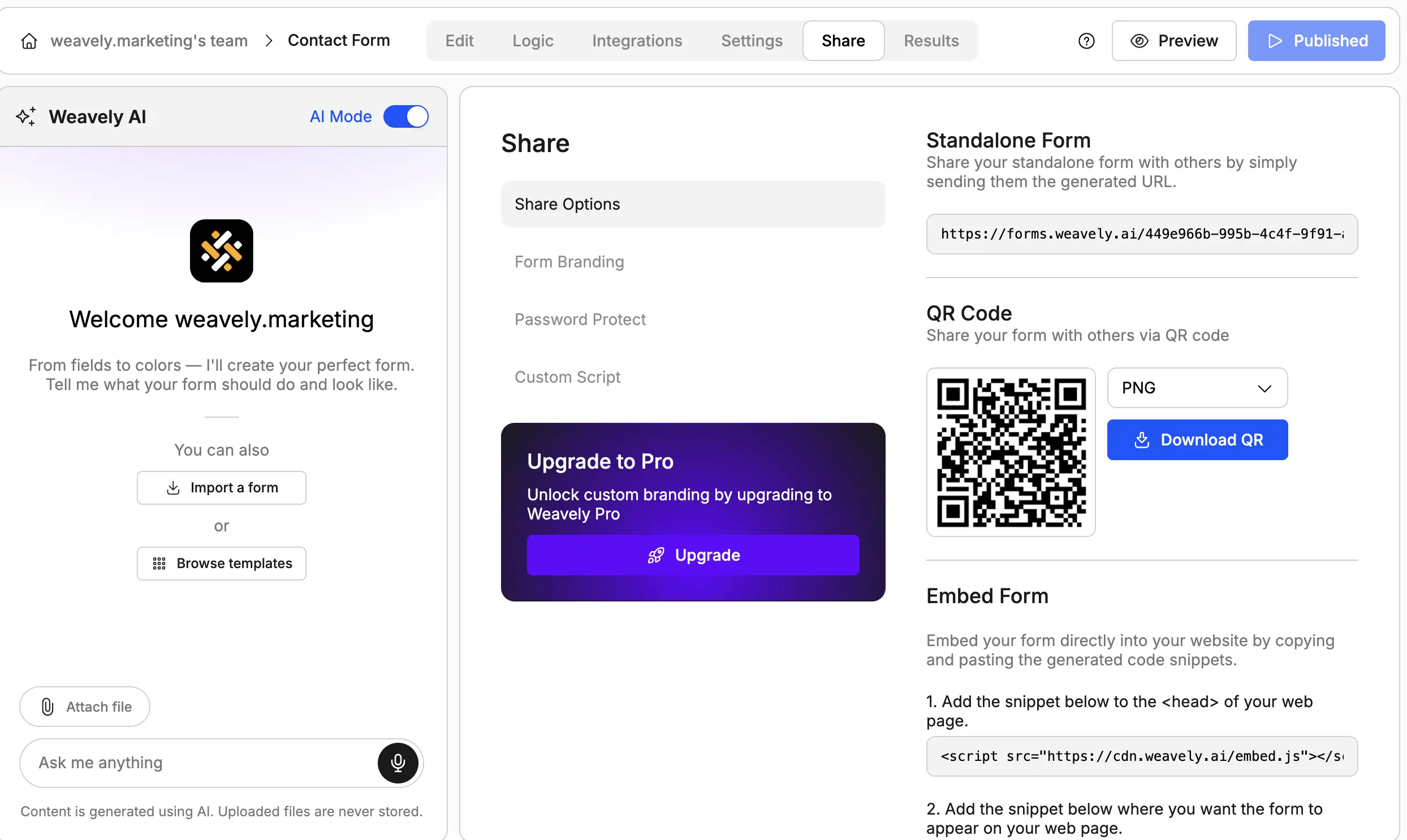
If you're using professional form software like Weavely, sharing forms via QR codes is one of the standard sharing options. You can access it via the Share tab and download in one click.
By they way, with Weavely you can create feedback forms and surveys by just providing it with a prompt or uploading a document. Your form will be generated in seconds, ready to be published and shared with your respondents.
QR code generator for Google Forms
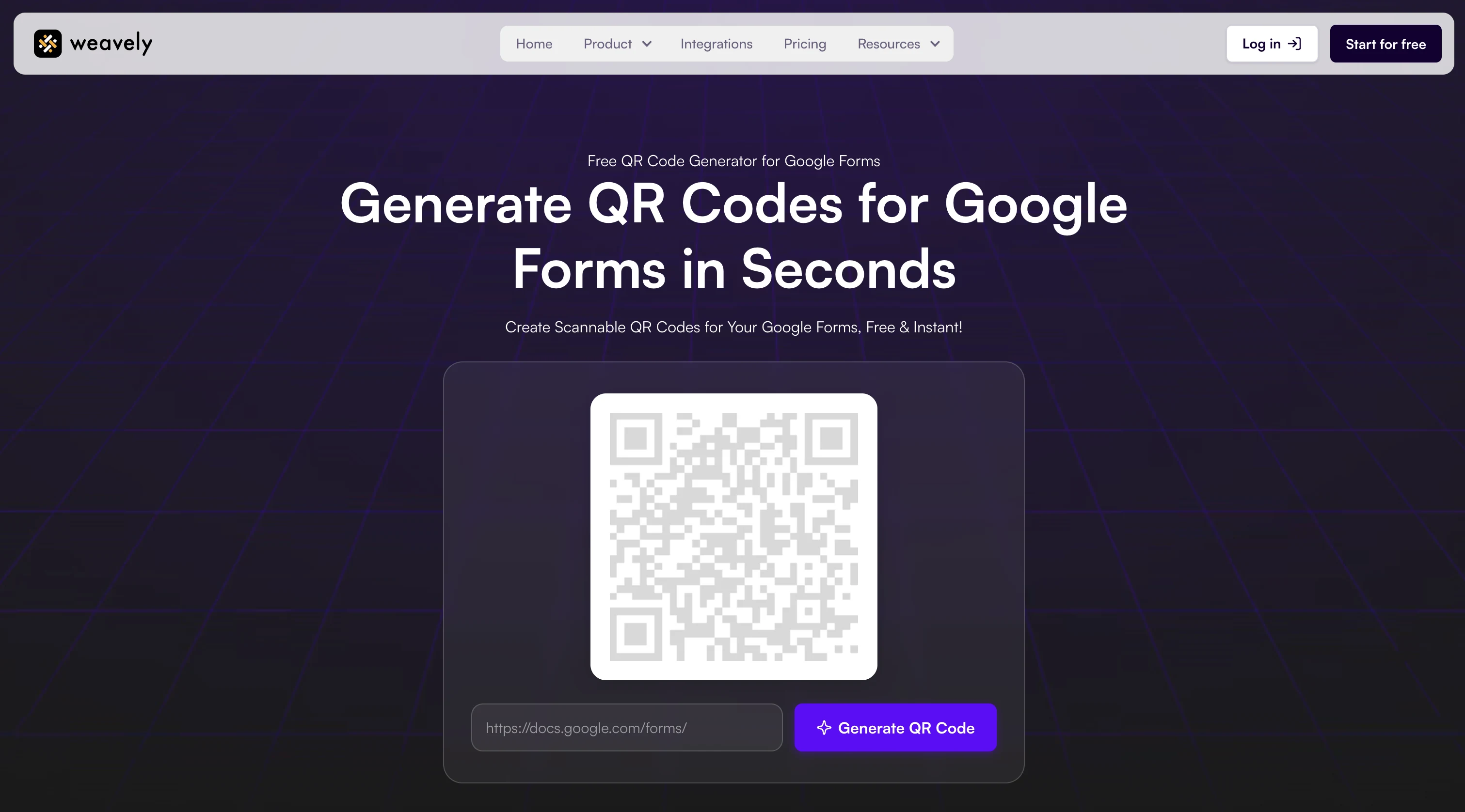
If you built your feedback survey in Google Forms, you need to generate a QR code for it using a third-party tool. Weavely offers a free tool to create a QR code for your Google form. Just paste a link to your form, and the tool will instantly generate a code that you can share with your respondents.
Reach your audience where they are
Instead of sending a standalone link that requires a user to leave their current task, you can bring the form directly into their existing environment. This reduces the number of steps a person needs to take, which naturally leads to higher completion rates.
For example:
- Website integration: you can embed your form directly onto a webpage so it functions as a native part of your site's content.
- Timed appearances: you can set the form to appear at the most relevant moment, such as in the bottom right of the screen after a user has spent a specific amount of time on a page.
- Multi-platform sharing: for faster distribution, you can copy a direct link and send it across chat apps or social media platforms to reach people where they are already active.
Offer incentives
Providing a tangible "why" is often the most effective way to drive form completion. If you want to ensure your audience hits submit, you can offer immediate value that rewards them for their time.
At the same time, in our case we're not talking about a large survey or a scientific research where people tend to provide paid incentives like vouchers or gift cards. So, the incentive here should be about reciprocity and impact.
In general, people are more likely to provide feedback if they feel their input actually changes the outcome of the event or the service they just used.
The impact incentive
Use your form’s greeting to explain exactly how their feedback will be used. For example, the next product release or event theme will depend on their responses. This gives people a sense of ownership over the future of the brand.
Immediate resource access
Instead of a gift card, the reward for finishing can be a link to the speaker’s slides, a summary of the session, or a "cheat sheet" for the topic discussed. This is like lead generation when you get people to leave their email address in exchange for a lead magnet, such as white papers or free demos, but for feedback.
Frequently asked questions
How can I share my Google Form via QR code?
Google Forms does not offer a native feature to generate QR codes for your forms. Weavely offers a free, easy QR code creator for your Google Forms. Simply paste your Google Form link into Weavely, and the AI will create an editable version that includes a built-in QR code generator.
Which form builders offer QR code sharing?
While many legacy tools require you to manually create codes elsewhere, tools like Weavely, Typeform or Fillout allow you to generate a QR code for your form directly within the platform.
How can I improve the scan rate of my QR code?
To get more people to scan, you should place the code where the user’s interest is highest, such as on a presentation slide or a physical flyer. Tip: Use AI to instantly apply your brand’s colors and logo to the form so users trust the destination immediately upon scanning.
How can I improve the completion rate of my form?
The best way to stop people from dropping off is to reduce form fatigue by using advanced conditional logic. This ensures respondents only see questions relevant to them. Additionally, making the form look better with custom fonts and layouts can make the process feel less like a chore.
How do I collect feedback effectively?
Effective feedback collection is about timing and value. Use a tool that allows you to embed forms directly on your website or set them to pop up at the right moment. You should also offer an incentive, such as immediate access to a resource or "instant feedback" on a quiz, to give the respondent a reason to finish

Tatiana is the Growth Marketing Manager at Weavely, where she's spent nearly four years running marketing end to end. From campaign strategy to the SEO content that brings new readers to the platform. Working day to day on a form builder gives her a front-row seat to what actually makes forms, surveys, and landing pages convert, and that's what she writes about here: practical, tested advice on lead generation and form design. Before Weavely, she led brand and SEO work at Digital Leap and cut her teeth on B2B and B2C content at Ruddy. She's based in Brussels.


